All posts by media-man

Work with us this fall!

Hey!

Are you a student?

Do you design? Develop? Love the web?

…or…

Do you make pictures? Want to learn to be a great photo editor?

If so, we’d very much like to hear from you. You’ll spend the fall working on the visuals team here at NPR’s headquarters in Washington, DC. We’re a small group of photographers, videographers, photo editors, developers and designers in the NPR newsroom who work on visual stuff for npr.org. Our work varies widely, check it out here.

Before you apply, please read our guide about what we expect in an internship application.

Photo editing

Our photo editing intern will work with our digital news team to edit photos for npr.org. It’ll be awesome. There will also be opportunities to research and pitch original work.

Please…

  • Love to write, edit and research
  • Be awesome at making pictures

Are you awesome? Apply now!

Design and code

This intern will work as a designer and/or developer on graphics and projects for npr.org. It’ll be awesome.

Please…

  • Our work is for the web, so be a web maker!
  • We’d especially love to hear from folks who love illustration, news graphics and information design.

Are you awesome? Apply now!

What will I be paid? What are the dates?

The deadline for applications is July 31, 2015.

Check out our careers site for much more info.

Thx!

PMDMC Did Little to Clarify the Future of Pledge Drives

There were two sessions on the future of public radio pledge drives at last week's Public Radio Development and Marketing Conference In Washington, DC.  The conference was organized by Greater Public, the industry's trade group for fundraising and marketing professionals.

Here's a summary of the main points from those two sessions.

1. It is getting harder to raise money during pledge drives.

2. Greater Public presented a formula for lowering pledge drive goals to counter the impact of sustaining (monthly) givers and $1,000+ donors on drive results.  The example shown at the conference suggested goals should be lowered by as much as 25%.  The exact percentage will vary by station. The more successful a station is with Sustaining Givers, the lower the goal will be.

3.  Greater Public's Fundraising benchmarks show that up to 90% of stations still had room to increase annual listener income through pledge drives.

Unfortunately, those three points taken together lead to just one conclusion -- many stations will need to do more on-air fundraising with lower goals in a tougher fundraising environment in order to meet their listener income potential. That's a recipe for more pledge drive days and, perhaps, more pledge drives per year.

A separate, but related, thread in these sessions was the new wave of shortening or eliminating pledge drives. Station representatives from Phoenix and upstate New York presented their current approaches to reducing on-air drives.

As noted in a previous post, we always learn something new and valuable when stations embrace more programming and less on-air fundraising. What hasn't changed in nearly two decades of drive shortening efforts is this -- the less on-air fundraising a station does, the less room it has to increase its on-air goals.

We know from past experience that the less on-air fundraising approach doesn't rule out growing annual listener income. Most of that growth, however, has to come outside of pledge drives.  That conflicts with Greater Public's assertion that most stations still have growth potential from on-air drives, even in a tougher fundraising environment.

In the end, the conference sessions did affirm the difficulties stations face and that could help foster productive dialogue between fundraisers and their station managers.  But moving forward to the Fall fundraising season, PMDMC didn't deliver any new industry-wide intelligence on how to address the pledge drive challenges ahead.  It feels like a missed opportunity.  

Rethinking Public Radio Station Brands

This week Public Radio Fundraising and Marketing professionals are meeting in Washington DC at the Public Media Marketing and Development Conference. 

Public Radio branding is one of the big topics as NPR News stations try to figure out how to remain relevant as listeners gain more direct access to their favorite NPR content.

A few years ago, the mantra was that Local is the Future for stations. That hasn't worked out so far and probably won't since NPR News listeners consider themselves citizens of the world. They are the epitome of "think globally, act locally."  The range of potential content available in a station's market is simply too narrow to win enough listening to remain sustainable. 

Thanks to a resurgence of podcasting, many stations are asking if their future is in podcasts.  Perhaps, but not solely.  Stations will need NPR as part of their broadcast and digital brand in order to remain viable, let alone grow, in the future.

They can do that as public media brand aggregators.

Think of it this way. NPR is Apple. Stations are Target, offering the leading brand (Apple) but also other top digital and electronics brands. Consumers can get most of Apple's products from either brand.  They can shop online.  They can go into an old-fashioned brick-and-mortar. 

Some consumers shop for Apple only through Apple.  Some shop only through brand aggregators such as Target.  Some do both.  The same behaviors will unfold in public radio.  The good news is that there's plenty of room in listeners' minds and hearts to embrace both.

Stations have always been brand aggregators by carrying programs such as Marketplace from APM, This American Life, and the Moth.  In the past, it almost worked against station interests to highlight those brands. 

Maybe that's changing. Consumers in the digital space are now learning that not everything good in public radio is from NPR.  They're learning there is more than one quality brand.

Being a quality brand aggregator can be a brand too!  Stations have an opportunity to become a primary source of the best brands in public radio -- over the radio and in the digital space. Stations have the opportunity to be the place to find listeners their favorite brands and discover new ones.  

One of those new brands should be the station's original programming, which does not necessarily have to be local and it doesn't have to be just news.  It has to be enriching and engaging.  It has to be comparable in quality to the best existing brands in public radio. It can be on the radio, digital, or both. Sense of Place is important but it is not necessary 100% of the time.

Great original content, easily found and consumed along side the best national content in public radio, will create a station brand that still highlights NPR but is much more than NPR.

I think this is a highly viable approach for stations. It works for Apple, perhaps the strongest consumer brand out there. It works for Target. It could work for NPR, stations, and other producers and distributors in public radio.

We’re hiring a designer!

The NPR Visuals team

Love to design and code?

Want to use your skills to make the world a better place?

We’re a crew of visual journalists (developers, designers, photojournalists…lots of things) in the newsroom at NPR headquarters in sunny Washington, DC. We make charts and maps, we make and edit pictures and video, we help reporters with data, and we create all sorts of web-native visual stories.

(And yeah, sometimes it’s kind of weird to be a visuals team at a radio organization. But there’s this special thing about audio. It’s intimate, it’s personal. Well, visual storytelling is really similar. It’s power is innate. Humans invented writing — visual and audio storytelling are built in, deep in our primordial lizard brains. So, anyway, yeah, we fit right in.)

Pictures and graphics are little empathy machines. And that’s our mission. To create empathy. To make people care.

It’s important work, and great fun.

And we’d love it if you’d join us.

We believe strongly that…

You must have…

  • Strong design skills, and experience implementing your designs on the web
  • A steely and unshakable sense of ethics
  • Attention to detail and love for making things
  • A genuine and friendly disposition

Bonus points for…

  • Serious front-end coding skills
  • Experience running user-centered design processes

Allow me to persuade you

The newsroom is a crucible. We work on tight schedules with hard deadlines. That may sound stressful, but check this out: With every project we learn from our mistakes and refine our methods. It’s a fast-moving, volatile environment that drives you to be better at what you do, every day. It’s awesome. Job perks include…

  • Live music at the Tiny Desk
  • All the tote bags you can eat
  • A sense of purpose

Know somebody who’d love this job?

Maybe it’s you?

Email bboyer@npr.org! Thanks!

When Engagement Really Worked

Posted To: Ideas & Innovation > Blogically Thinking

This article first appeared June 22, 2015 in Nieman Labs.

Nowadays, we often seek to measure media engagement by social media activity, web metrics or attention minutes.

But there was a time in the not-so-distant past – before the Internet and social media disrupted traditional media – when genuine engagement really worked.  A period when news organizations actually involved people in their communities so successfully it triggered impact.

With last week’s celebration of the tremendous journalism contributions of Ed Fouhy, the award-winning broadcast executive and founder of the Pew Center for Civic Journalism, it seemed like a good time to revisit what we already learned – but may have forgotten.

During the heyday of civic journalism, which spanned a decade starting in the early ‘90’s, the Pew Center funded 120 newsroom projects and rewarded scores more with the James K. Batten Awards. More than 600 CJ initiatives were counted and studied by U-Wisconsin researchers, who found a pattern of outcomes. Some 78 percent of the projects studied offered solutions, and more than half included solutions offered by citizens themselves.

I was on the frontlines of this activity. Fouhy hired me in 1994 to be his Pew Center deputy. A couple years later, I took his place at the helm.

I find it striking how many of these efforts foreshadowed what we now call interactive and participatory journalism.

Civic journalism began as a way to get political candidates to address the public’s agenda in running for office. News organizations soon adapted its techniques, starting with polls and town hall meetings, to difficult problems in their communities. Later on-ramps involved civic mapping, email, voice mail, cutting-edge video technologies, and eventually, of course, the Internet.

Key hallmarks of these civic journalism initiatives included:

  • Building specific ways to involve readers and viewers.
  • Deliberately positioning ordinary people as capable of some action.
  • Inviting the community to identify solutions.

Consider how some of these efforts played out:

Taking Back Our Neighborhoods: This seminal initiative, a finalist for a Pulitzer Public Service Award, set the bar high for CJ projects.  It evolved from the 1993 shooting of two Charlotte, N.C. police officers.

Determined to address the root cause of crime, The Charlotte Observer partnered with WSOC-TV to synchronize in-depth coverage and give people things they could do reclaim their communities.

Elements included data analysis, which identified patterns of crime and the most violent neighborhoods to spotlight. A poll asked residents how crime affected them, why crime was happening and what were possible solutions. Town hall meetings and neighborhood advisory panels in 10 targeted communities contributed very specific lists of neighborhood “needs” that were published with each community’s narrative.

Outcomes were impressive:  Some 700 volunteers stepped up to fulfill the needs on those lists – from opening new recreation centers to making uniforms for a fledgling drill team. Eighteen law firms filed pro bono nuisance suits to close crack houses. New community centers were built and neighborhoods were cleaned up. Eight years later, crime was still down and the quality of life had improved in eight of the 10 neighborhoods.

West Virginia After Coal: The Herald-Dispatch in Huntington, W.Va., and West Virginia Public Broadcasting joined forces in 2000-01 to examine one of the state’s biggest issues: Its future without coal.  

The partners developed a groundbreaking database that exposed how virtually none of the $18 million in coal severance taxes distributed to the state’s 55 counties and 234 municipalities were being used for economic development. Instead, the funds paid for such things as dog wardens or postage. The media partners used statewide polls and an interactive town hall involving audience input from 10 different sites via cutting-edge video conferencing technology. By the project’s end, the state was promising more job training and more revenue targeted to economic development.

Waterfront Renaissance: In 2001 The Herald of Everett, Wa. engaged the community in plans to remake its waterfront. It held a town hall meeting on development plans and created online clickable maps with moveable icons to give residents a virtual vote on what should be built along the Snohomish River and Port Gardner Bay. Some 1,200 people participated. The Herald tabulated the results of these maps and submitted their findings to city officials. A prevailing theme was that people wanted any development to give them access to their riverfront. Their wishes were ultimately included in city plans. The project today remains a prime example of how to involve citizens in surrogate “public hearings.”

Neighbor to Neighbor: In 2002, after the shooting of an unarmed teenager in Cincinnati sparked allegations of police misconduct and major rioting, The Cincinnati Enquirer embarked on an ambitious project. It held solutions-oriented conversations on how to improve race relations in every municipality and neighborhood in the regions – some 145 in all.  

Each group was asked to answer:

  • What three things can people do to ease racial tensions?
  • What three things would we like to see our community leaders do?
  • How can we make it happen?

Some 1,838 people participated; 300 people volunteered to host or facilitate the conversations. The project inspired much grassroots volunteerism and efforts among black and whites to interact. The project "started people talking together, going to dinner, meeting in their homes and going to school and churches together,” said then-managing editor Rosemary Goudreau at the time.

There were scores of similar robust projects:

  • The Savannah Morning News involved a large citizen task force in discussions and visits to 15 U.S. schools to figure out how to improve local education.
  • A 1997 series on alcoholism, “Maine’s Deadliest Drug,” by The Portland Press Herald and Maine Sunday Telegram led to citizen forming 29 study circles that concluded with an action plan to stem alcohol abuse.
  • We the People/Wisconsin, involving the Wisconsin State Journalism and the state’s public broadcaster, engaged in some of longest-running efforts to bring citizens face-to-face with candidates running for statewide office.

To be sure, journalism investigations often lead to widespread change. But, to me, so many of today’s journalism success stores seem pallid by comparison to what I saw during the period of civic journalism experimentation.

Simply put: civic journalism worked.  Readers and viewers got it.

We learned that if you deliberately build in simple ways for people to participate – in community problems or elections – many will engage.  Particularly if they feel they have something to contribute to the problem.

Nowadays, this is so much easier than it used to be. All that is needed is the creativity to make it happen.

Jan Schaffer is executive director of J-Lab, a successor to the Pew Center and an incubator for entrepreneurial news startups.


Navigating Law for Media Startups

Posted To: Ideas & Innovation > Blogically Thinking

This was first published March 10, 2015 on Mediashift.

When I launched J-Lab in 2002, the best piece of advice I received was to have a lawyer draft a Memorandum of Understanding outlining the relationship between my center and its soon-to-be home, the University of Maryland.

The agreement detailed how I would support my startup, who owned the intellectual property, how much the university would charge for administering my incoming grants – and how I might spin the center into its own 50s(c)3 or affiliate with another fiscal agent in the future.

Thanks to that MOU, when U-MD changed its rules for grant-supported centers, I was able to seamlessly transition to American University. The MOU basically served as a pre-nup agreement.

I never really expected to need the MOU – until I did. So, too, are new media startups finding themselves in situations where they need to know about, and plan for, an array of legal issues.  Many of these issues particularly affect digital-first news sites.  

With this, and many more experiences under my belt, I approached Jeff Kosseff, a Washington, D.C., media lawyer and fellow A.U. adjunct, about co-authoring “Law for Media Startups.” We wanted to make it a user-friendly e-guide to what news entrepreneurs need to know and also help them identify when they needed professional help.

Next, I recruited CUNY’s Tow-Knight Center for Journalism Entrepreneurship to help support the project.  The result: our 12-chapter guide that we hope will be as helpful to educators teaching media law courses and it will be to startup founders themselves.  A downloadable PDF is coming soon.

Most journalists are used to working with legal counsel for such things as pre-publication review of important stories.  But legal issues for digital-first news startups extend far beyond such traditional First Amendment issues as defamation, privacy and open government.

“New media has not changed the law of libel at all,” said Richard Tofel, ProPublica’s president and its resident lawyer. “But it has changed the breadth of laws entrepreneurs need to know about.”

How should you respond when someone is demanding the IP address or the identity of a commenter on your sites. How should you flag sites that steal your content? How can your make sure, in a rush to add an image to an article, that you are not posting a copyrighted photo?  How to deal with a freelancer’s request to use for another assignment research gathered for a story you commissioned? When it is OK for someone to be a freelancer and when do they have a right to be an employee?

“The No. 1 question by far that we hear from our members is about freelancer contracts and rights,” said Kevin Davis, executive director of the Investigative News Network.

The IRS sets out very specific guidelines addressing who should be an employee and who can be an independent contractor.  As important, it requires all unpaid interns to meet six specific conditions.

All digital-first news startups are collecting some type of data on their users, and while most journalists advocate for openness and transparency, as an Internet-based business, you have a number of legal obligations to keep certain formation private. You also need to tell your users how you will use their data.

Certainly, one of the biggest misconceptions some online publishers have is that you websites will only have immunity if you take a hands-off approach, and don’t edit or moderate any comments. Indeed, according to the e-guide, “service providers have wide latitude to edit, delete, or even select user content without being held responsible for it.”

Again and again, I have reviewed applications for J-Lab funding that promised that the startup would get grants to support its work.  However, the applicant was neither a nonprofit nor affiliated with one and, therefore. was not eligible for the grants they wanted to support their business.  News entrepreneurs need to understand what being a nonprofit entails or pick another business structure.

As our guide notes, “journalism is not something the IRS recognizes as having a tax-exempt purpose.” So, if you embark on applying for 501(c)3 status, you need to flesh out how you will be different from a regular commercial publisher.

In the media startup space, legal needs can be surprising. Lorie Hearn, founder of inewsource.org, has partnered with a number of media outlets to amplify her investigative stories in the San Diego area.

But she says she has begun to feel the need to craft written distribution agreements to cover inewsource partnerships with other news outlets, especially pertaining to how they credit her material on their websites. Some “want their own correspondents to come in and interview our people and make like this is a joint investigation,” she said.

For that, she will likely seek out a lawyer who has worked closed with her site over the years.

To read about more issues, see the full guide here.


Should Public Radio Offer Incentives to Attract New Digital Listeners?

The strategic use of incentives helps make public radio pledge drives more successful. They help boost the number of donations during key dayparts. They motivate some listeners to give at certain pledge levels and in ways that are beneficial to the station.

Incentives were successfully used in the late 1980s and early 1990s to encourage listeners to give via credit card instead of asking for an invoice. One of the most popular credit card incentives was an annual subscription to Newsweek magazine. Each subscription cost the station a dollar.

Incentives were successfully used in the late 1990s and early 2000s to encourage giving via the station web site. Stations held special “cyber days” to get listeners to give online. One of the most famous cyber days was in 1999 at WAMU when the station gave away a new Volvo.

Public radio has no problem offering incentives to generate contributions and encourage ideal giving behaviors.  Why not try the same for digital listening?

We know from decades of research that listening causes giving. And having more listening makes it easier to generate more underwriting revenue. Getting more listening, generating more public service, is the best fundraising a station can do. It might make sense to accelerate digital listening by offering some incentives for listeners to try it.

It’s an interesting prospect. There could be incentives for downloading an app or registering to listen online. There could be incentives for first use or the first ten hours of listening or a certain number of podcast downloads.

What types of incentives? That’s the fun part. We get to test.

Maybe it is offering bonus content or a coupon code for the NPR Shop. Maybe it is a dining discount with an underwriter or a digital coupon for a local bookseller. Perhaps it is a “vintage” t-shirt or mug from the back of the premium closet. Maybe a Bluetooth speaker is offered at a special discount price to digital listeners who use the station 10 times over two weeks.

Digital listening is supposed to be an essential component of public radio’s future. That means public radio’s finances will depend on it. It just might be worth the testing whether incentives can accelerate digital audience growth.

Promoting Digital Listening Like Your Survival Depends On It

How would you promote your public radio station’s on-line stream if the station’s very existence depended on it?

It’s not a hypothetical question.  Every public radio station faces that situation today as more of its listeners and donors spread their listening across broadcast and digital platforms.

It wasn’t a hypothetical question five years ago for Classical KDFC in San Francisco.  KDFC was a commercial radio station and its owner decided to drop the format.  Classical music lost its home at 102.1 FM.

The University of Southern California and KUSC stepped in and acquired two lesser signals on which to broadcast KDFC as a public radio station.  Two frequencies.  Far less coverage.  More than 100,000 distraught listeners who could no longer hear the station over the air.

KDFC already had a good digital presence.  It had streams and mobile apps.  It was social media savvy.  It had a good database and a newsletter.

KDFC researched the many ways listeners could easily hear its programming through digital platforms.  It developed recommendations for Internet radio options and how to use Bluetooth to send sound to external speakers.  It developed the simplest possible narrative for communicating those options.  It heavily promoted that narrative across all available touch points.  This went on for months.

Listeners who could no longer hear KDFC reached out to the station as well and KDFC was prepared to help them with information and support. That support went as far as KDFC’s program hosts returning phone calls from listeners and walking them through the steps necessary to hear the station online.  It was a daily occurrence.

Embedded in KDFC’s story is a template for how all public radio stations should be promoting their digital listening options.
  • Start with the goal of helping as many listeners as possible learn to create a quality listening experience on a computer, to listen via an app, to use external speakers at home and in the car, and to find and listen to a podcast or on demand content.
  • Have up-to-date and easy to use digital listening options.
  • Develop a simple narrative describing the benefits of using the station’s digital offerings, including step-by-step instructions on how to get the most out of each option.
  • Promote the heck out of it using every possible touch point, including on-air.
  • Provide prompt individualized customer service when needed.
  • Rinse and Repeat.
That last point is really important.  Rinse and repeat.

KDFC ended up with five different radio signals throughout the Bay Area.  Most of its previous coverage area was restored three years ago.  In some areas the station has even better coverage. KDFC promoted those new signals even more heavily than it originally promoted online listening, including billboard and bus card advertising, and has rebuilt much of its audience.

Still, 5 years after losing its original signal and 3 years after restoring most of its coverage, a pledge drive doesn’t go by without hearing from past listeners who are just discovering that KDFC is back on the air in their community. They didn’t get the message.

Rinse and repeat.  There’s always someone who didn’t hear the message.  There’s always some who has just discovered your station for the first time.

Growing digital listening is too important to not be engaged in continuous promotion.  To borrow and modify an old slogan from PBS, if you aren’t going to effectively promote your own digital offerings, who will?

If Digital is the Future, Public Radio Needs to Promote it Better Now

I just spent part of the last two days listening to 50 station breaks across 14 different large and medium market public radio stations. Every station is considered to be a top station in public radio and most are considered to be digitally savvy. Some quick numbers:
  • 43 of the breaks (86%) had absolutely no promotion for the station's digital listening offerings.
  • 8 of the 14 stations had no digital listening promotion. I listened to at least 3 breaks in one hour for each station.
  • Of the 5 stations that had some sort of digital listening promotion, 3 mentioned more than one type of digital listening in the same break.  For example, the website was promoted as a way to stream the station and as a way to hear the station's new podcast.
  • 1 station qualified as promoting digital listening only because it included the website in its legal ID, "...and online at WXZY.org."  That's more of a throw away mention than a promotion, but I still counted it.
There's not a whole lot to say here other than this is a woefully inadequate level of self-promotion given the importance of digital listening to public radio's future.  It is a notable lack of promotion given public radio's decades-long marketing lament, "If only more people knew about us."

When it comes to digital, even the people who know about us through the radio probably don't really know about our digital offerings.

It is going to be tough enough to win new listeners with the infinite number of media options now available in the digital space. Stations need to make it a priority to move as many current listeners as possible to its digital platforms. That starts with the station selling current listeners on those digital offerings. Right now, that doesn't appear to be happening in any meaningful way.

In the next post, a possible template for the promotion of digital listening.

Simplifying Map Production

Map of recent Nepal earthquakes

When news happens in locations that our audience may not know very well, a map seems like a natural thing to include as part of our coverage.

But good maps take time.*

In ArcMap, I’ll assemble the skeleton of my map with shapefiles from Natural Earth and other sources and find an appropriate projection. Then I’ll export it to .AI format and bring it into Adobe Illustrator for styling. (In the example below, I also separately exported a raster layer for shaded relief.) And then I’ll port the final thing, layer by layer, to Adobe Photoshop, applying layer effects and sharpening straight lines as necessary.

Mapping process

(* Note: I enjoy making maps, but I am unqualified to call myself a cartographer. I owe much, though, to the influence of cartographer colleagues and GIS professors.)

I concede that this workflow has some definite drawbacks:

  • It’s cumbersome and undocumented (my own fault), and it’s difficult to train others how to do it.

  • It relies on an expensive piece of software that we have on a single PC. (I know there are free options out there like QGIS, but I find QGIS’s editing interface difficult to use and SVG export frustrating. ArcMap has its own challenges, but I’m used to its quirks and the .AI export preserves layers better.)

  • This reliance on ArcMap means we can’t easily make maps from scratch if we’re not in the office.

  • The final maps are flat images, which means that text doesn’t always scale readably between desktop and mobile.

  • Nothing’s in version control.

So for the most recent round of Serendipity Day at NPR (an internal hackday), I resolved to explore ways to improve the process for at least very simple locator maps – and maybe bypass the expensive software altogether.

Filtering And Converting Geodata

My colleague Danny DeBelius had explored a little bit of scripted mapmaking with his animated map of ISIS-claimed territory. And Mike Bostock has a great tutorial for making maps using ogr2ogr, TopoJSON and D3.

(ogr2ogr is a utility bundled with GDAL that converts between geo formats. In this case, we’re using it to convert GIS shapefiles and CSVs with latitude/longitude to GeoJSON format. TopoJSON is a utility that compresses GeoJSON.)

Danny figured out how to use ogr2ogr to clip a shapefile to a defined bounding box. This way, we only have shapes relevant to the map we’re making, keeping filesize down.

ogr2ogr -f GeoJSON -clipsrc 77.25 24.28 91.45 31.5 data/nepal-geo.json ../_basemaps/cultural/ne_10m_admin_0_countries_v3.1/ne_10m_admin_0_countries.shp

We applied that to a variety of shapefile layers — populated places, rivers, roads, etc. – and then ran a separate command to compile and compress them into TopoJSON format.

ogr2ogr -f GeoJSON -clipsrc 77.25 24.28 91.45 31.5 data/nepal-geo.json ../_basemaps/cultural/ne_10m_admin_0_countries_v3.1/ne_10m_admin_0_countries.shp

ogr2ogr -f GeoJSON -clipsrc 77.25 24.28 91.45 31.5 data/nepal-cities.json -where "adm0name = 'Nepal' AND scalerank < 8" ../_basemaps/cultural/ne_10m_populated_places_simple_v3.0/ne_10m_populated_places_simple.shp

ogr2ogr -f GeoJSON -clipsrc 77.25 24.28 91.45 31.5 data/nepal-neighbors.json -where "adm0name != 'Nepal' AND scalerank <= 2" ../_basemaps/cultural/ne_10m_populated_places_simple_v3.0/ne_10m_populated_places_simple.shp

ogr2ogr -f GeoJSON -where "featurecla = 'River' AND scalerank < 8" -clipsrc 77.25 24.28 91.45 31.5 data/nepal-rivers.json ../_basemaps/physical/ne_10m_rivers_lake_centerlines_v3.1/ne_10m_rivers_lake_centerlines.shp

ogr2ogr -f GeoJSON -clipsrc 77.25 24.28 91.45 31.5 data/nepal-lakes.json ../_basemaps/physical/ne_10m_lakes_v3.0/ne_10m_lakes.shp

ogr2ogr -f GeoJSON -clipsrc 77.25 24.28 91.45 31.5 data/nepal-roads.json ../_basemaps/cultural/ne_10m_roads_v3.0/ne_10m_roads.shp

topojson -o data/nepal-topo.json --id-property NAME -p featurecla,city=name,country=NAME -- data/nepal-geo.json data/nepal-cities.json data/nepal-neighbors.json data/nepal-rivers.json data/nepal-lakes.json data/nepal-roads.json data/nepal-quakes.csv

(Why two separate calls for city data? The Natural Earth shapefile for populated places has a column called scalerank, which ranks cities by importance or size. Since our example was a map of Nepal, I wanted to show a range of cities inside Nepal, but only major cities outside.)

Mapturner

Christopher Groskopf and Tyler Fisher extended that series of ogr2ogr and TopoJSON commands to a new command-line utility: mapturner.

Mapturner takes in a YAML configuration file, processes the data and saves out a compressed TopoJSON file. Users can specify settings for each data layer, including data columns to preserve and attributes to query. The config file for our Nepal example looked like this:

bbox: '77.25 24.28 91.45 31.5'
layers:
    countries:
        type: 'shp'
        path: 'http://www.naturalearthdata.com/http//www.naturalearthdata.com/download/10m/cultural/ne_10m_admin_0_countries.zip'
        id-property: 'NAME'
        properties:
            - 'country=NAME'
    cities:
        type: 'shp'
        path: 'http://www.naturalearthdata.com/http//www.naturalearthdata.com/download/10m/cultural/ne_10m_populated_places_simple.zip'
        id-property: 'name'
        properties:
            - 'featurecla'
            - 'city=name'
            - 'scalerank'
        where: adm0name = 'Nepal' AND scalerank < 8
    neighbors:
        type: 'shp'
        path: 'http://www.naturalearthdata.com/http//www.naturalearthdata.com/download/10m/cultural/ne_10m_populated_places_simple.zip'
        id-property: 'name'
        properties:
            - 'featurecla'
            - 'city=name'
            - 'scalerank'
        where: adm0name != 'Nepal' AND scalerank <= 2
    lakes:
        type: 'shp'
        path: 'http://www.naturalearthdata.com/http//www.naturalearthdata.com/download/10m/physical/ne_10m_lakes.zip'
    rivers:
        type: 'shp'
        path: 'http://www.naturalearthdata.com/http//www.naturalearthdata.com/download/10m/physical/ne_10m_rivers_lake_centerlines.zip'
        where: featurecla = 'River' AND scalerank < 8
    quakes:
        type: 'csv'
        path: 'data/nepal.csv'
        properties:
            - 'date'
            - '+intensity'

Mapturner currently supports SHP, JSON and CSV files.

Drawing The Map

I’ve been pretty impressed with the relative ease of using D3 to render maps and test projections. Need to adjust the scope of the map? It might just be a matter of adjusting the map scale and centroid (and, if necessary, expanding the overall bounding-box and re-running the mapturner script) — much faster than redrawing a flat map.

Label positioning is a tricky thing. So far, the best way I’ve found to deal with it is to set up an object at the top of the JS with all the nit-picky adjustments, and then checking for that when the labels are rendered.

var CITY_LABEL_ADJUSTMENTS = [];
CITY_LABEL_ADJUSTMENTS['Biratnagar'] = { 'dy': -3 };
CITY_LABEL_ADJUSTMENTS['Birganj'] = { 'dy': -3 };
CITY_LABEL_ADJUSTMENTS['Kathmandu'] = { 'text-anchor': 'end', 'dx': -4, 'dy': -4 };
CITY_LABEL_ADJUSTMENTS['Nepalganj'] = { 'text-anchor': 'end', 'dx': -4, 'dy': 12 };
CITY_LABEL_ADJUSTMENTS['Pokhara'] = { 'text-anchor': 'end', 'dx': -6 };
CITY_LABEL_ADJUSTMENTS['Kanpur'] = { 'dy': 12 };

Responsiveness makes label positioning even more of a challenge. In the Nepal example, I gave each label a class corresponding to its scalerank, and then used LESS in a media query to hide cities above a certain scalerank on smaller screens.

@media screen and (max-width: 480px) {
    .city-labels text,
    .cities path {
        &.scalerank-4,
        &.scalerank-5,
        &.scalerank-6,
        &.scalerank-7,
        &.scalerank-8 {
            display: none;
        }
    }
}

Our finished example map (or as finished as anything is at the end of a hackday):


There’s still more polishing to do — for example, the Bangladesh country label, even abbreviated, is still getting cut off. And the quake dots need more labelling and context. But it’s a reasonable start.

Drawing these maps in code has also meant revisiting our map styles — colors, typography, label and line conventions, etc. Our static map styles rely heavily on Helvetica Neue Condensed, which we don’t have as a webfont. We do have access to Gotham, which is lovely but too wide to be a universal go-to. So we may end up with a mix of Gotham and Helvetica — or something else entirely. We’ll see how it evolves.

Locator Maps And Dailygraphics

We’ve rolled sample map code into our dailygraphics rig for small embedded projects. Run fab add_map:$SLUG to get going with a new map. To process geo data, you’ll need to install mapturner (and its dependencies, GDAL and TopoJSON). Instructions are in the README.

Caveats And Next Steps

  • This process will NOT produce finished maps — and is not intended to do so. Our goal is to simplify one part of the process and get someone, say, 80 percent of the way to a basic map. It still requires craft on the part of the map-maker — research, judgement, design and polish.

  • These maps are only as good as their source data and the regional knowledge of the person making them. For example, the Natural Earth country shapefiles still include Crimea as part of Ukraine. Depending on where your newsroom stands on that, this may mean extra work to specially call out Crimea as a disputed territory.

  • When everything’s in code, it becomes a lot harder to work with vague boundaries and data that is not in geo format. I can’t just highlight and clip an area in Illustrator. We’ll have to figure out how to handle this as we go. (Any suggestions? Please leave a comment!)

  • We’ve figured out how to make smart scale bars. Next up: inset maps and pointer boxes. I’d also like to figure out how to incorporate raster topo layers.

Let’s Tesselate: Hexagons For Tile Grid Maps

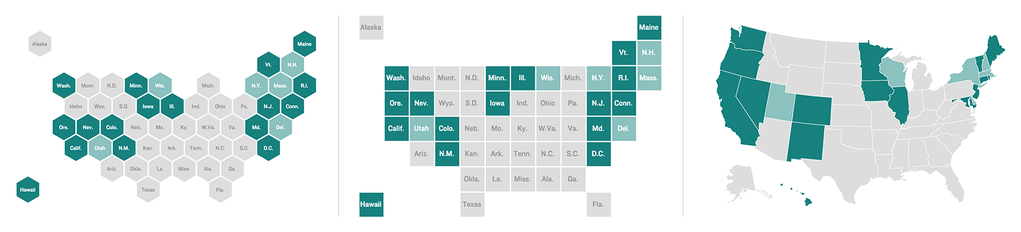
A hexagon tile grid, square tile grid and geographic choropleth map. Maps by Danny DeBelius and Alyson Hurt

A hexagon tile grid, square tile grid and geographic choropleth map. Maps by Danny DeBelius and Alyson Hurt.

As the saying goes, nothing is certain in this life but death, taxes and requests for geographic data to be represented on a map.

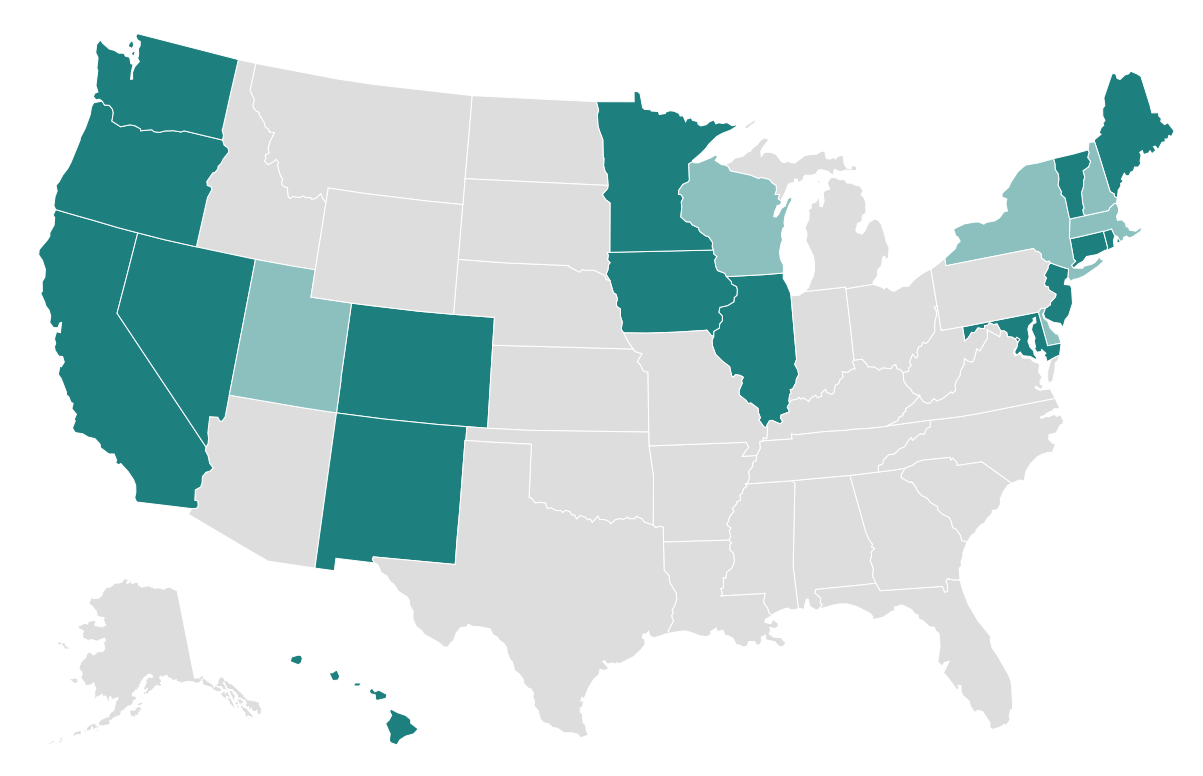
For area data, the choropleth map is a tried and true visualization technique, but not without significant dangers depending on the nature of the data and map areas represented. Clarity of mapped state-level data, for instance, is frequently complicated by the reality that most states in the western U.S. carry far more visual weight than the northeastern states.

Are more northeastern states shaded than western? That’s hard to say with this type of choropleth. Whatever, though. West coast, best coast, right?

Are more northeastern states shaded than western? That’s hard to say with this type of choropleth. Whatever, though. West coast, best coast, right?

While this presentation is faithful to my Californian perception of the U.S. where the northeast is a distant jumble of states I pay little attention to, I’ve learned in four years of living in D.C. that there are actually a lot of people walking around that jumble, and they’d prefer not to be ignored in mapped data visualizations. There are approximately 74 million people living in the thirteen states the U.S. Census Bureau defines as the Western United States, while around 42 million people live just in the combined metropolitan statistical areas of New York, Washington, Boston and Philadelphia.

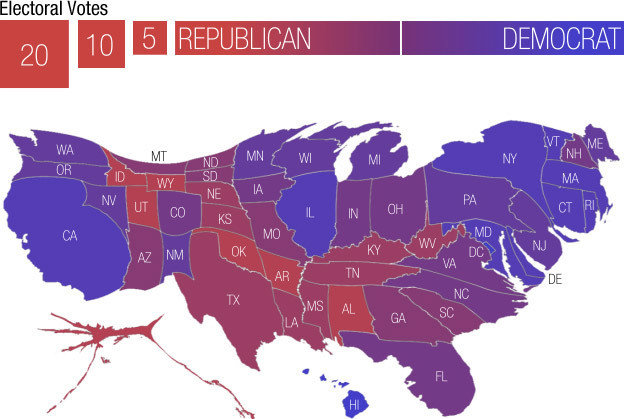
One popular solution to this problem is the cartogram — maps where geography is distorted to correspond with some data variable (frequently population). By shading and sizing map areas, a cartogram can display two variables simultaneously. In this New York Times example from the 2012 election, the size of the squares corresponds to the number of electoral votes assigned to each state, while the shade represents possible vote outcomes. NPR’s Adam Cole used this technique to size states according to electoral votes and ad spending, as seen in the map below. Cartograms can be a great solution with some data sets, but they introduce complexity that might not serve our ultimate goal of clarity.

A cartogram of the U.S. with states sized proportionally by electoral votes. Map by Adam Cole.

A cartogram of the U.S. with states sized proportionally by electoral votes. Map by Adam Cole.

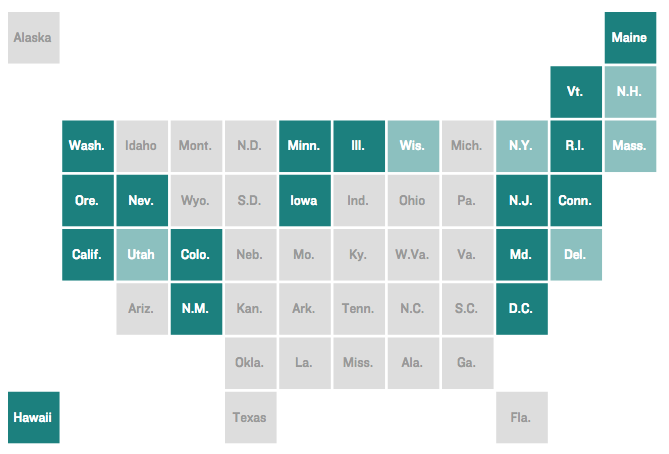
Recently, a third variation of choropleth has gained popularity — the tile grid map. In this version, the map areas are reduced to a uniform size and shape (typically a square) and the tiles are arranged to roughly approximate their real-world geographic locations. It’s still a cartogram of sorts, but where the area sizing is based on the shared value of one “map unit.” Tile grid maps avoid the visual imbalances inherent to traditional choropleths, while keeping the map a quick read by forgoing the complexity of cartograms with map areas sized by a variable data point.

Tile grid maps are a great option for mapped state data where population figures are not part of the story we’re trying to tell with the map. Several news organizations have used this approach to great effect, including FiveThirtyEight, Bloomberg Business, The Guardian, The Washington Post and The New York Times.

A square tile grid map

A square tile grid map.

Here at NPR, we recently set out to create a template for quickly producing this type of map, but early in the process my editor Brian asked, “Do the tiles have to be squares?”

More specifically, Brian was interested in exploring the possibility of using hexagons instead of squares, with the assumption that two additional sides would offer greater flexibility in arranging the tiles and a better chance at maintaining as many border adjacencies as possible.

The idea was intriguing, but I had questions about sacrifices we might make in scanability by trading the squares for hexagons. The columns and rows of a square grid lend to easy vertical and horizontal scanning, and I wondered if the tessellation of hexagons would provide a comfortable reading experience for the audience.

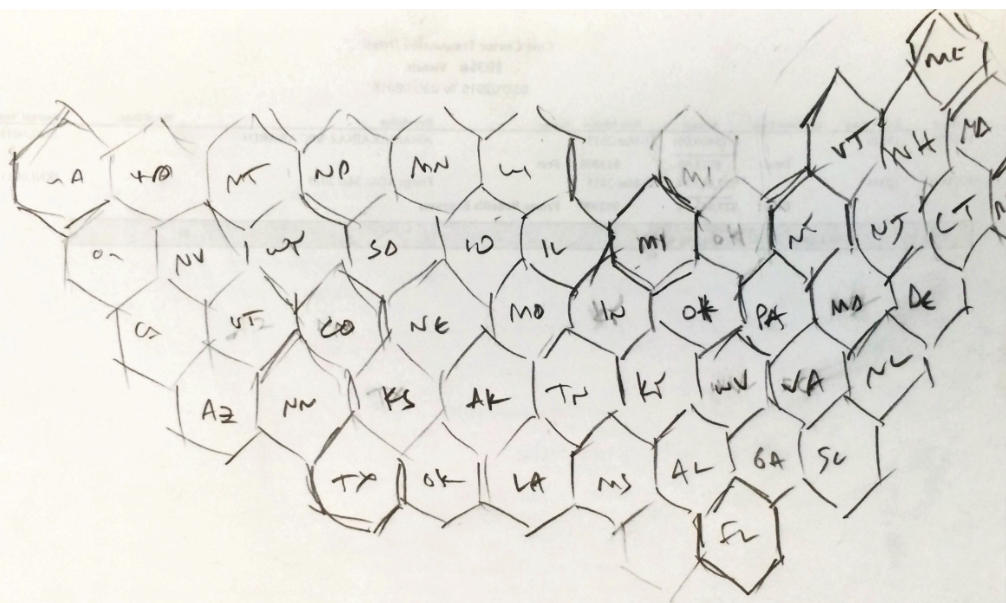
Here is Brian’s first quick pencil sketch of a possible state layout using hexagons:

Brian’s hex grid sketch.

Brian’s hex grid sketch.

That proof of concept was enough to convince me that the idea was worth exploring further. I opened up Sketch and redrew Brian’s map with the polygon tool so we could drag the states around to experiment with the tile layout more easily. We tried several approaches in building the layout, starting from each coast and building from the midwest out, to varying degrees of success.

Ultimately, I decided to prioritize accuracy in representing the unique geographic features of the U.S. border (Texas and Florida as the southernmost tips, notches for the Great Lakes) and making sure the four “corners” of the country were recognizable for orientation.

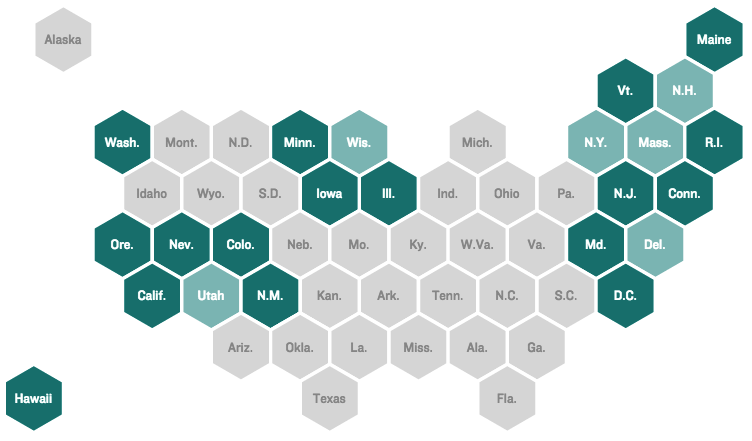
The final layout that will power our tile grid map template looks like this:

Six sides instead of four! That means it’s two better, right?

Six sides instead of four! That means it’s two better.

This map still has many of the same problems that other attempts at a tile layout of the U.S. have fallen into — the relationship of North and South Carolina, for one example — but we like the increased fidelity of the country’s shape the hex grid makes possible.

In case you were wondering, news dev Twitter loves talking about maps:

We recently published our first use of the hexagon tile grid map to show the states that currently have laws restricting discrimination in employment, housing and public accommodations based on sexual orientation, gender identity and gender expression. The hex grid tile map also made appearances in several presentations of last week’s U.K. election results, including those by The Guardian, Bloomberg Business and The Economist.

What do you think? Vote in the poll below!

Tech note: Connecting to an Amazon RDS database from a legacy EC2 server

Amazon’s Relational Database Service (RDS) is an excellent way to host databases. The service is affordable, low-maintenance, and self-contained. If you use the Amazon cloud, there are precious few reasons to maintain your own database server.

At some point, Amazon started requiring RDS instances to use Virtual Private Cloud (VPC) networking. However, if you’re like the NPR Visuals team, you might have older Amazon Elastic Cloud Compute (EC2) server instances that don’t use VPC but need to connect to RDS databases. Even if you don’t, you might need to connect to your RDS instance locally.

As is often the case with Amazon, it’s not entirely clear how to configure the correct security rules to allow access from outside the VPC. Here’s what worked for us.

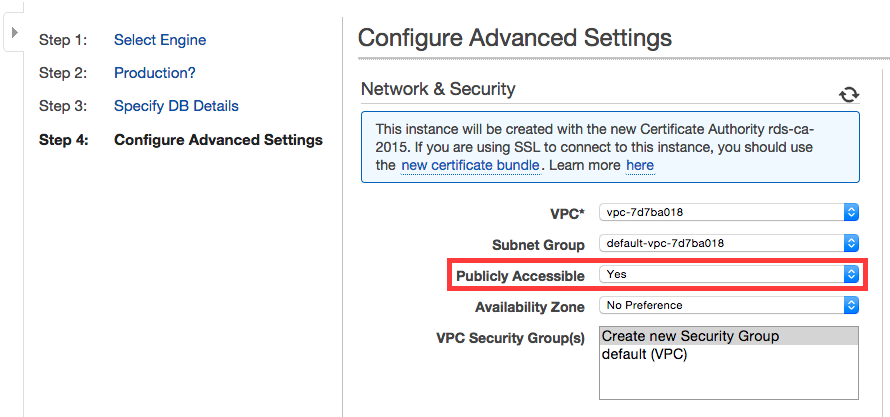
During creation, make sure your RDS instance is publicly accessible. This setting cannot be edited later.

Make your RDS instance publicly accessible

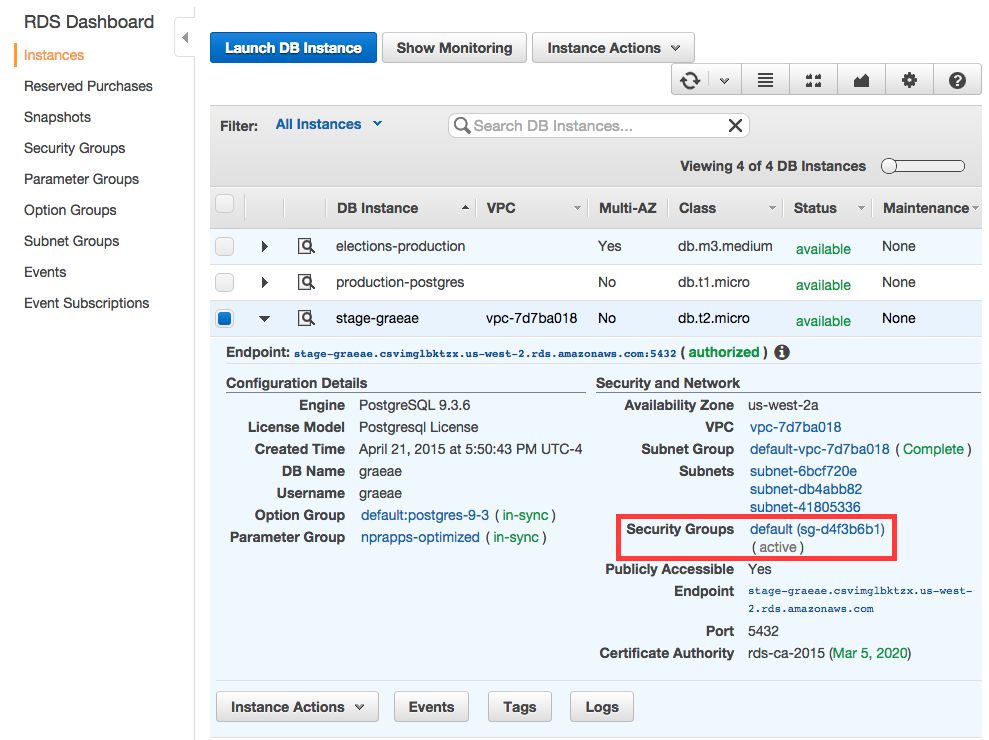
For the security group setting, either option will suffice, though creating a new security group will help isolate the network access rules for this database instance.

Once created, click on the security group from the instance details:

Click the security group link

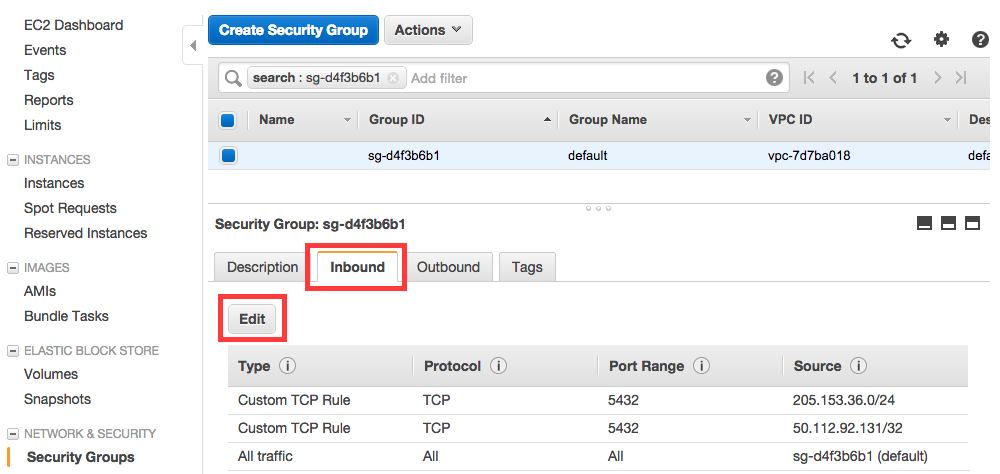
A new tab or window will open with the security group selected. Click the “Inbound” tab in the lower window pane, then click the “Edit” button to add rules to allow the IP addresses you want to access the RDS instance

Click inbound tab, then click edit

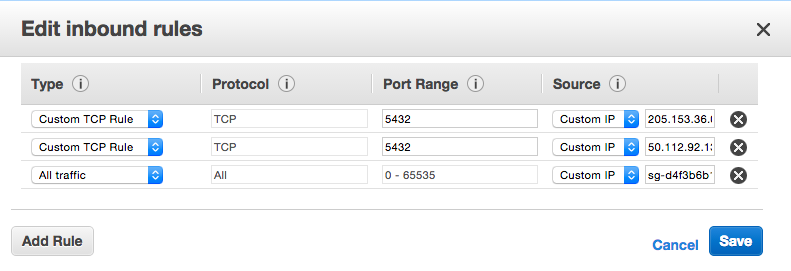
Now you can configure the inbound rules in the modal that opens:

Edit inbound rules in the modal

I found a lot of places in the VPC interface to set inbound rules, but only the security group rules actually worked to allow local machines and non-VPC EC2 instances access to the RDS database.

If you know a better way to handle this, let us know in the comments!

Better, faster, more: recent improvements to our dailygraphics rig

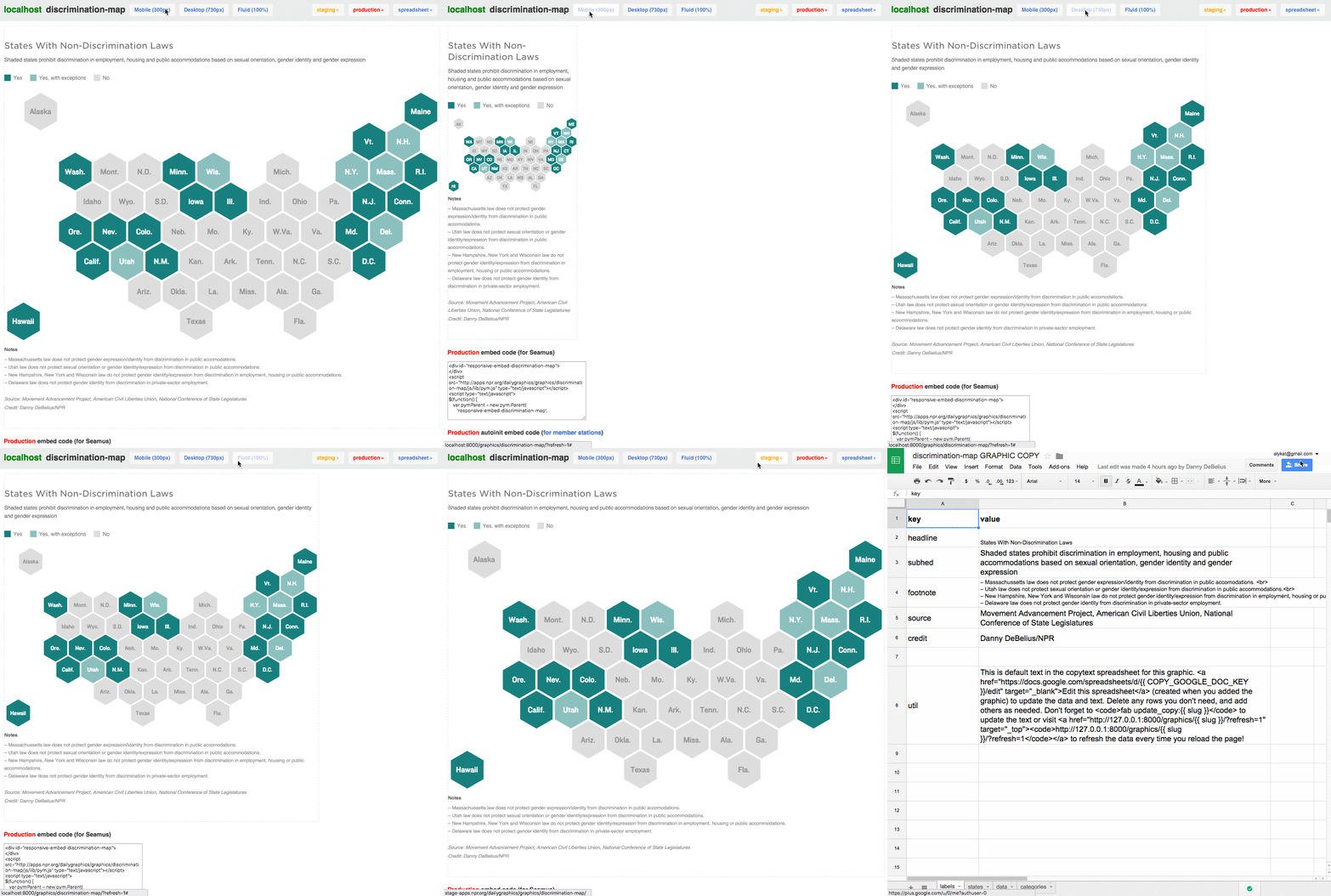
In the past couple weeks the Visuals team has consciously shifted resources to focus on the parts of our work that have the highest impact. As part of this reorganization the graphics team has grown from one (Graphics Editor Alyson Hurt) to two—the second being me! Having a dedicated engineer working on daily graphics means we are doubling down both the amount of content we can create and on the tools we use to create it. For the last week I’ve been sprinting on a slew of improvements to our dailygraphics rig. Most of these are small changes, but collectively they represent the biggest iteration we’ve made to dailygraphics since creating it over a year ago.

OAuth

Amongst a group of features we’ve ported over from the app-template is the addition of an OAuth support for access to our “copytext” Google spreadsheets. This means Google credentials no longer need to be stored in environment variables, which increases security and portability. (Hat tip to David Eads for untangling OAuth for all of our projects.)

This change also allowed us to implement a more significant feature: automatically creating copytext spreadsheets. Each time you add a graphic a spreadsheet will be automatically created. (You can opt out of this by not specifying a COPY_GOOGLE_DOC_KEY in your base graphic template or by deleting graphic_config.py entirely.)

Rewriting the copytext workflow has also allowed as to add a “refresh flag” to the preview. Now anytime you pass ?refresh=1 with your graphic preview url, the preview app will automatically re-download the latest copytext before rendering. This can tremendously accelerate editing time for text-heavy graphics.

Advanced graphic templates

As our graphics pipeline has matured we’ve started to run into many of the same limitations that prompted development of the app-template. As a result, we’ve reincorporated features such as template inheritance, asset compression and LESS support.

The base template

All graphic templates now “inherit” from a base template, which is found in graphic_templates/_base. When a new graphic is created, this folder is copied to the new graphic’s path before the normal graphic template (e.g. graphic_templates/bar_chart). This base template can house files common to all templates for easy updates. (The individual graphic templates can copy over any or all of them.)

The base template also includes a base_template.html which the original child_template.html now inherits from using Jinja2 template inheritance. This change means you can now make a change to the header or footer of your graphics and have it instantly incorporated in all your graphic templates. (Not retroactively though, every graphic is still a copy of all assets and templates.)

LESS and asset compression

All CSS files in graphic templates can now be LESS files, which will be automatically compiled during preview and deployment. The resulting CSS assets will be automatically compiled into a single file and compressed by using this code in the base template:

<!-- CSS + LESS -->
{{ CSS.push('css/base.less') }}
{{ CSS.push('css/graphic.less') }}
{{ CSS.render('css/graphic-header.css') }}

Mirroring the app-template, this same pattern is followed for compressing Javascript assets:

{{ JS.push('js/lib/jquery.js') }}
{{ JS.push('js/lib/d3.min.js') }}
{{ JS.push('js/lib/modernizr.svg.min.js') }}
{{ JS.push('js/lib/pym.js') }}
{{ JS.push('js/base.js') }}
{{ JS.push('js/graphic.js') }}
{{ JS.render('js/graphic-footer.js') }}

Google Analytics support

Our new base template also now includes code for embedding Google Analytics with your graphics. We’ve long wanted to be able to track detailed analytics for our graphics, but putting analytics inside in the iframe would have resulted in impressions being counted twice—once for the parent page and once for the child page. To avoid this we’ve recently begun tracking our project analytics on a separate Google property from that used for NPR.org. This allows us to put our custom analytics tag inside the iframe while our traditional pageviews are captured by the parent analytics tags.

Improvements to the graphic viewer (parent.html)

Perhaps the most obvious changes to the dailygraphics rig are our suite of improvements to the graphic preview template (a.k.a. parent.html). These changes are aimed at making it easier to see how the final graphic will work and making it faster to test. They include:

  • Resize buttons for quickly testing mobile and column layouts.
  • Border around the graphic so you can see how much margin you’ve included.
  • An obvious label so you know which environment you’re working in (local, staging, production).
  • One-click links to other environments and to the copytext spreadsheet (if configured).
  • Easy-to-copy Core Publisher embed code (for NPR member stations).

Other improvements

In addition to these larger improvements we’ve also made a couple of smaller improvements that are worth noting:

Upgrading

If you’re a user of the dailygraphics rig we strongly encourage you to upgrade and incorporate these new improvements into your process. I think they’ll make your graphics workflow smoother and much more flexible. After pulling the latest code you’ll need to install new requirements. Node.js is now a dependency, so if you don’t have that you’ll need to install it first:

brew install node
curl https://npmjs.org/install.sh | sh

Then you can update your Node and Python dependencies by running the following commands:

pip install -Ur requirements.txt
npm install

Please remember that everything in the dailygraphics rig still works on copies, so upgrading will not retroactively change anything about your existing graphics.

If you’re using the improved dailygraphics rig, let us know!

The Well-Chosen Word Matters in Pledge Drives Too

One of the big challenges during public radio pledge drives is avoiding clichés. They pop into the appeals of even the most experienced on-air pitchers. Fundraising fatigue will do that to you. 

Pledge drive clichés aren’t effective at persuading listeners that their support is important. 

You are the public in public radio.

And it is unlikely a cliché ever motivated someone to drop what she was doing to make a contribution.

We meet our goal one pledge at a time. Just you and 19 other people in the next 2 minutes gets us there.

For the most part, pledge drive clichés are silly filler.However, there’s a new one going around that is downright ridiculous and, in my opinion, a bit damaging.

It’s time to begin your financial relationship with the station.

When I hear this on the air, I can’t help but think about how Paula Poundstone might react using her best “Wait Wait… let’s stop the show for a moment while I ask a few questions to sort this out” voice. It goes something like this:

Hold on a second. Did you say that you want to begin a financial relationship with me?  How does that work?  I give you 10 bucks a month and you go halfsies with me on my kid's college tuition?

On-air fundraising is hard. In some ways it is the most challenging programming to produce in public radio because it is live and, even when heavily scripted, subject to spontaneity.

Sometimes that spontaneity makes the fundraising more effective. Other times it undermines not only the fundraising, but also the larger effort to build a true relationship with listeners beyond the programming.

It’s time to begin your financial relationship with the station.

Who talks like that in real life?

Public radio is successful because the well-chosen word still matters. Listeners will hear poorly-chosen words on-air as long as stations do traditional pledge drives. It's one of the costs of doing business that way.

It’s important to remember that the pledge drive words are just as much a part of how listeners think and feel about the station as the words they hear while listening to programming. Stations should strive to recognize those poorly-chosen words when they inevitably happen and ensure that they don’t become clichés that hurt the station’s image more than they help it.

Shoter Pledge Drives… Again!


Public radio is in another cycle of conducting shorter on-air pledge drives.  
 
The latest cycle started at North Country Public Radio (NCPR) in upstate New York.  Last fall, NCPR produced what it called a Warp Drive, allowing it to meet its $325,000 campaign goal with just 3 hours of traditional on-air fundraising. The typical NCPR drive was five days full of fundraising interruptions. 
 
NCPR achieved this through weeks of more aggressive off-air fundraising (email, direct mail, social media) supported by short on-air announcements that didn’t interrupt the programming.  Several stations have followed NCPR’s lead and have been able to cut their drives from more than a week to mere days, even hours.  Vermont Public Radio managed to meet its $350,000 goal without having to interrupt programming at all.
 
The “less on-air fundraising” movement isn’t new to public radio. There was a lot of experimentation in the mid-1990s. We helped WBUR in Boston cut a drive from 10 days to 3 hours with More News, Less On-air Fundraising. The station managed to keep drives very short for a little more than a year.  WKSU in Kent, OH pioneered All the Money in Half the Time. Many stations tried variations of these ideas throughout the 90s with good results. 
 
In the early 2000s, WUWM in Milwaukee eliminated its entire Fall drive for 3 or 4 years in a row using strategies similar to NCPR’s Warp Drive.  Around the same time, WSKG in Binghamton, NY invented the 1-Day pledge drive. 
 
Sonja Lee, who is part of our firm Sutton & Lee, helped perfect the 1-Day drive concept while she was at KBBI in Homer, AK. She helped us create a 1-Day drive kit and consulting package used by more than a dozen stations.  A few of those stations have been doing nothing but 1-Day pledge drives for years, including five straight years for Northwest Public Radio in Pullman, WA.
 
Shorter drives, by themselves, provide no long-term fundraising benefit. The real fundraising benefit of shortening drives is the leverage it provides when trying to get more sustaining members and direct mail givers. These types of donors have greater long-term value to the station. The promise of shortening or eliminating drives helps change their giving behavior.
 
It should come as no surprise then that drive shortening efforts tend to work best at stations with under-developed off-air fundraising programs.  There’s more financial opportunity.
 
Really short drives don’t last long at most stations. There are several reasons including:
 
- Failing to upgrade off-air fundraising efforts or maintain them at the highest level. After a few big successes, pledge drives get longer again in order to capture lapsed donors and lost off-air revenue. 
 
- Increased revenue demands. Stations increase their spending over time more than they can improve their off-air fundraising results.  Then the pledge drive creep begins.
 
- Novelty. Short drives are at their most efficient the first go-around. The actual on-air part of shorter drives make less money over time as listeners get used to them. The first few drives bring in lots of additional gifts as current members reward the station for doing less fundraising. The novelty wears off and the additional gifts go away.
 
This is where NCPR has made an important innovation. Almost every past approach to less on-air fundraising had a "pre-drive" that helped shorten the drive. NCPR flips that and says that the weeks leading up to the on-air pitching *are* the drive. The on-air part is merely clean-up. That's a very good message.  It redefines the drive and might help create future additional gift opportunities when the novelty wears off.  Whether that pans out remains to be seen.
 
Acquiring new members can be an issue over time but it is not initially a problem for most stations. At first, stations sees a spike in renewal rates and lapsed donors coming back. So even when new member counts are down, the donor database grows through better retention and reacquisition. This can last as long as two or three years if the off-air fundraising efforts are firing on all cylinders.
 
Will this cycle of shorter drives lead to a lasting change in how public radio conducts on-air fundraising?  Probably not.
 
NCPR repeated its Warp Drive approach this Spring and needed 2.5 days of traditional fundraising to meet its campaign goal.  While that’s a lot more than the 3 hours it required in the Fall, it is still a great success.  It’s half as much fundraising as the station used to do.  That’s good fundraising and good stewardship of the airwaves.
 
And, as with every past cycle to shorten drives, this one is helping public radio learn new things about fundraising that will make more stations stronger in a future where traditional pledge drives could be as much of a liability as an asset.

Making small multiples maps with invar

Mapping the spread of Wal-Mart

For a recent story on the growth of Wal-Mart in urban areas we set out to map Wal-Marts across the US and over time. Due to limitations with our dataset, we only ended up mapping three cities. Here is the graphic we produced:

Automation is key to generating these sorts of maps. There are huge number of things that could go wrong if each one was produced by hand. For this story the automated process involved connecting several different tools and many different data sources. In this post I’m going to set that complexity aside and focus on just the final part of the toolchain: outputting SVG maps for final styling in Illustrator. If you’re interested in the complete process, we’ve open sourced the code here.

Why use many little maps?

For this story the maps we produced were used as “small multiples”, that is, many small images that collectively illustrate a something larger. However, there are many other occasions where producing small maps is useful, such as when illustrating city or county-level data for many hundreds of places. Sometimes it’s necessary to generate these maps dynamically, but in many cases they can be pre-generated and “looked up” as needed.

From XML to SVG

To generate map images we used a tool I originally wrote over four years ago, when I was working for the Chicago Tribune: invar.

invar is a suite of three command line tools:

  • ivtile generates map tiles suitable making slippy maps.
  • ivframe generates individual maps centered on locations.
  • ivs3 bulk uploads files (such as map tiles) to Amazon S3 for distribution.

Both ivtile and ivframe use Mapnik as a rendering engine. Mapnik allows you to input an XML configuration file specifying styles and datasources and output map images as PNGs or SVGs. For example, here is a fragment of the configuration for the circles (“buffers”) around each store:

<Layer name="buffers" status="on" srs="+init=epsg:4269">
    <StyleName>buffer-styles</StyleName>
    <Datasource>
        <Parameter name="type">postgis</Parameter>
        <Parameter name="host">localhost</Parameter>
        <Parameter name="dbname">walmart</Parameter>
        <Parameter name="table">(select * from circles where year::integer &lt;= 2005 order by range desc) as buffers</Parameter>
    </Datasource>
</Layer>

<Style name="buffer-styles">
<Rule>
    <Filter>[range] = 1</Filter>
    <PolygonSymbolizer fill="#28556F" />
</Rule>
<Rule>
    <Filter>[range] = 2</Filter>
    <PolygonSymbolizer fill="#3D7FA6" />
</Rule>
</Style>

In this example we query a PostGIS table called circles to get buffers for stores opened before or during 2005. (The &lt; escaping is an unfortunate necessity for getting the XML to parse correctly.) We then color the circles differently based on whether they represent a one or two mile range. To render the map for Chicago we would run:

ivframe -f svg --name chicago_2005.svg -z 10 -w 1280 -t 1280 map.xml . 41.83 -87.68

(You can also render a series of images using coordinates from a CSV. See the invar docs for more examples and more details on the flags being used here.)

Documentation of the Mapnik XML format is relatively sparse, but Googling frequently turns up working examples. If the XML annoys you too badly, there are also Python bindings for Mapnik though personally I’ve never had much luck generating maps from scratch with them.

Using invar to make your own maps

invar is easy to install, just pip install invar. Unfortunately, the Mapnik dependency is notoriously difficult. You’ll find instructions specific to your platform on the Mapnik wiki. (If you’re on OSX I recommend brew!) This is the only time I will ever suggest not using virtualenv to manage your Python dependencies. Getting Mapnik to work within a virtualenv is a painful process and you’re better off simply installing everything you need globally. (Just this once!)

Dusting off invar after not having used it for a long time gave me a good opportunity to fix some critical bugs and the new 0.1.0 release should be the most stable version ever. More importantly, it now supports rendering SVG images, so you can produce rough maps with invar and then refine them with Illustrator, which is what we did for the Wal-Mart maps. Go ahead and give it a spin: the full documentation is here. Let us know how you use it!

Law for Media Startups – New Entrepreneurship Guide

Posted To: Press Releases

For immediate release
Noon, March. 4, 2015
Contact: Jan Schaffer
jans@j-lab.org


J-Lab partners with CUNY to create e-guide


Washington, D.C.“Law for Media Startups,” a new resource for entrepreneurs launching news ventures and educators teaching students how to do it, was published today by CUNY’s Tow-Knight Center for Entrepreneurial Journalism.

The 12-chapter web guide was written by Jan Schaffer, J-Lab executive director, and Jeff Kosseff, media lawyer for Covington & Burling LLP law firm in Washington, D.C. The Tow-Knight Center supported the research, writing and production as part of its suite of entrepreneurial journalism resources.

“This guide goes beyond traditional First Amendment law to address every-day issues news entrepreneurs confront,” Schaffer said. “From native advertising to labor law and fair use, it supplies what I found missing for my students.”

"Every day, innovators are developing new ways to deliver news and content to consumers," Kosseff said. "I hope this guide helps them identify the legal issues that they should be considering as they build their business models."

Small digital news startups are facing a range of legal issues as they set up their business operations, gather and report the news, protect their content, and market and support their news ventures. They need to know classic First Amendment law – and much more. This guide offers an introduction to many of those issues, from hiring freelancers and establishing organizational structures, to native advertising and marketing, to maintaining privacy policies and dealing with libel accusations. It seeks to help jumpstart the launch of news ventures and help entrepreneurs know when to seek professional legal help.

“The news ecosystem of the future will be made up of enterprises of many sizes, shapes, and forms, including journalistic startups that need help with their businesses and the law” said Jeff Jarvis, Director of the Tow-Knight Center. “Jan Schaffer and Jeff Kosseff provide an invaluable guide to help them recognize legal pitfalls. It complements other research from Tow-Knight on a variety of business practices.”

Jeff Kosseff is a communications and privacy attorney in Covington & Burling’s Washington, D.C. office, where he represents and advises media and technology companies. He is co-chair of the Media Law Resource Center’s legislative affairs committee. He clerked for Judge Milan D. Smith, Jr. of the U.S. Court of Appeals for the Ninth Circuit and Judge Leonie M. Brinkema of the U.S. District Court for the Eastern District of Virginia. He is an adjunct professor of communications law at American University, where he teaches in its MA in Media Entrepreneurship program. Before becoming a lawyer, Kosseff was a journalist for The Oregonian and was a finalist for the Pulitzer Prize and recipient of the George Polk Award for national reporting.

Jan Schaffer is executive director of J-Lab, an incubator for news entrepreneurs and innovators, and Entrepreneur in Residence at American University’s School of Communication, where she also teaches in its MA in Media Entrepreneurship program. She launched J-Lab in 2002 to help newsrooms use digital technologies to engage people in public issues. It has funded 100 news startups and pilot collaboration projects and it has commissioned and developed a series of online journalism resources that include Launching a Nonprofit News Site, Top Ten Rules for Limited Legal Risk and The Journalist’s Guide to Open Government. As the federal court reporter for The Philadelphia Inquirer, she was part of a team awarded the Pulitzer Gold Medal for Public Service for a series of stories that won freedom for a man wrongly convicted of five murders and led to the civil rights convictions of six Philadelphia homicide detectives.

The “Law for Media Startups” guide also invites media lawyers around the country to contribute information on state-specific laws that apply to news entrepreneurs, following the guide’s template for laws in Virginia.

J-Lab is a journalism catalyst that has provided funding and resources for news startups. It has funded 100 startups and pilot projects since 2005.

The Tow-Knight Center for Entrepreneurial Journalism offers educational programs, supports research, and sponsors events to foster sustainable business models for quality journalism. It is part of the City University of New York's Graduate School of Journalism, and funded by The Tow Foundation and The Knight Foundation.


Switching to OAuth in the App Template

Suyeon Son and David Eads re-worked the authentication mechanism for accessing Google Spreadsheets with the NPR Visuals App Template. This is a significant change for App Template users. Here’s why we did it and how it works.

Most App Template developers only need to consult the Configuring your system and Authenticating sections of this post, provided someone on your team has gone through the process of creating a Google API application and given you credentials.

Why OAuth?

Prior to this change, the App Template accessed Google spreadsheets with a user account and password. These account details were accessed from environment variables stored in cleartext. Storing a password in cleartext is a bad security practice, and the method led to other dubious practices like sharing credentials for a common Google account.

OAuth is a protocol for accessing online resources on behalf of a user without a password. The user must authenticate with the service using her password to allow the app to act on her behalf. In turn the app receives a magic access token. Instead of directly authenticating the user with the service, the application uses the token to access resources.

There are many advantages to this approach. These access tokens can be revoked or invalidated. If used properly, OAuth credentials are always tied to an individual user account. An application can force all users to re-authenticate by resetting the application credentials. Accessing Google Drive resources with this method is also quite a bit faster than our previous technique.

Setting up the Google API application

To use the new OAuth feature of the App Template, you will need to create a Google API project and generate credentials. Typically, you’ll only need to do this once for your entire organization.

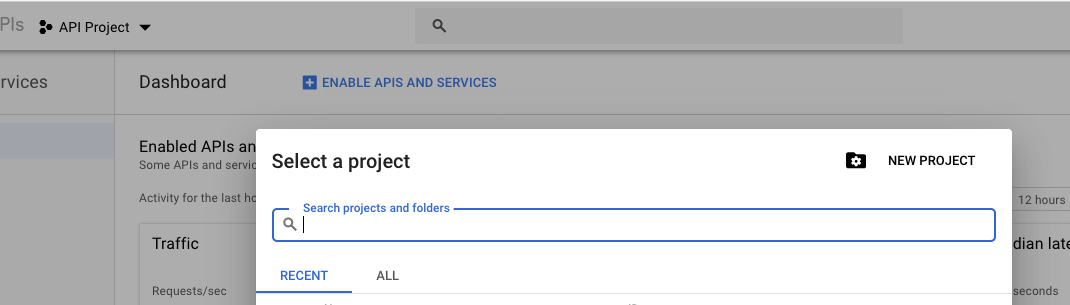
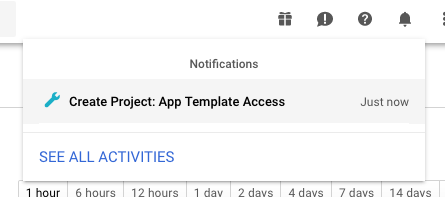
Visit the Google Developer’s Console and click “Create Project”.

Give the project a name for the API dashboard and wait for the project to be created:

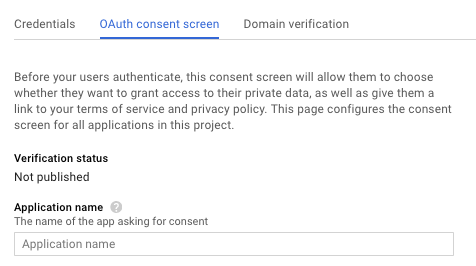
Give the project a name again (oh, technology!) by clicking “Consent screen” in the left hand toolbar:

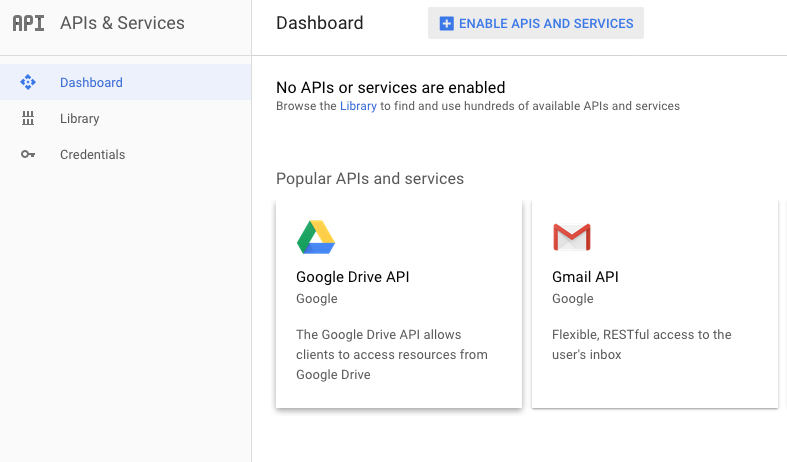
Enable the Drive API by clicking “APIs” in the left hand toolbar, searching for “Drive” and enabling the Drive API:

You can optionally disable the default APIs if you’d like.

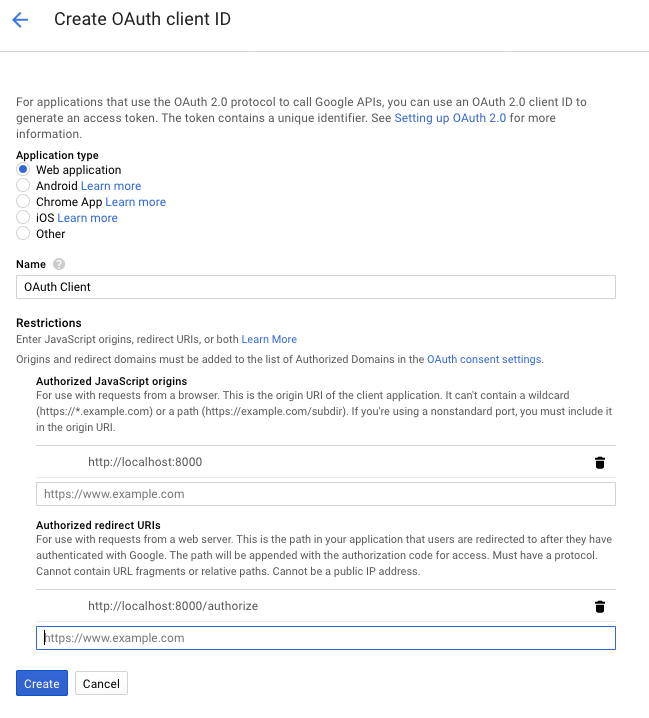
Finally, create client credentials by clicking “Credentials” in the left hand toolbar and then clicking “Create New Client ID”:

Make sure “Web application” is selected. Set the Javascript origins to “http://localhost:8000”, “http://127.0.0.1:8000”, “http://localhost:8888” and “http://127.0.0.1:8888”. Set the Authorized Redirect URIs to “http://localhost:8000/authenticate/”, “http://127.0.0.1:8000/authenticate/”, “http://localhost:8888/authenticate/” and “http://127.0.0.1:8888”.

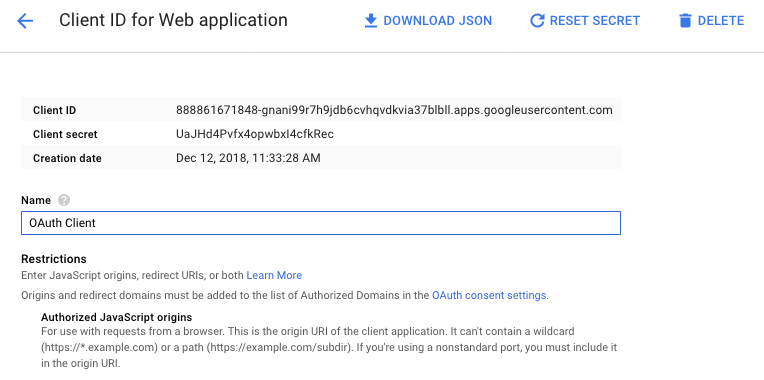
Now you have some credentials:

Configuring your system

Whew! Happily, that’s the worst part. Typically, you should only do this once for your whole organization.

Add some environment variables to your .bash_profile or current shell session based on the client ID credentials you created above:

export GOOGLE_OAUTH_CLIENT_ID="825131989533-7kjnu270dqmreatb24evmlh264m8eq87.apps.googleusercontent.com"
export GOOGLE_OAUTH_CONSUMER_SECRET="oy8HFRpHlJ6RUiMxEggpHaTz"
export AUTHOMATIC_SALT="mysecretstring"

As you can see above, you also need to set a random string to act as cryptographic salt for the OAuth library the App Template uses.

Authenticating

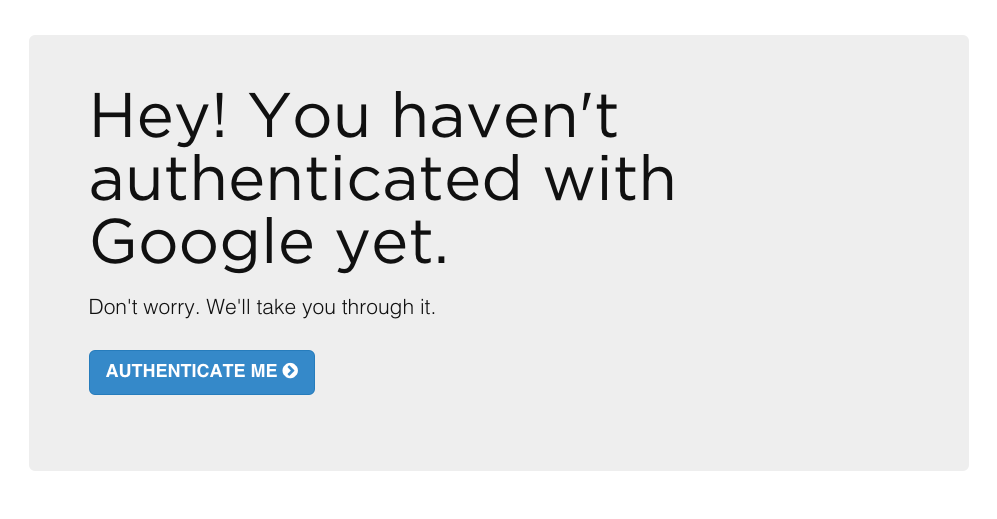
Now, run fab app in your App Template project and go to localhost:8000 in your web browser. You’ll be asked to allow the application to access Google Drive on behalf of your account:

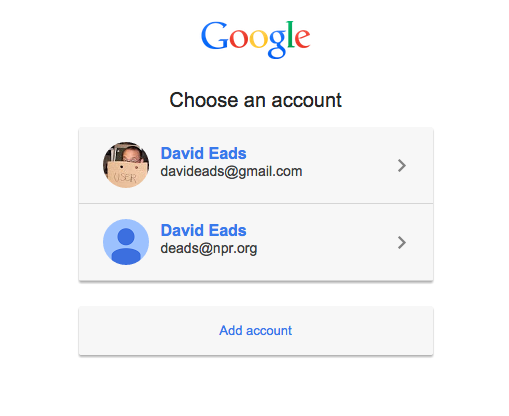
If you use multiple Google accounts, you might need to pick one:

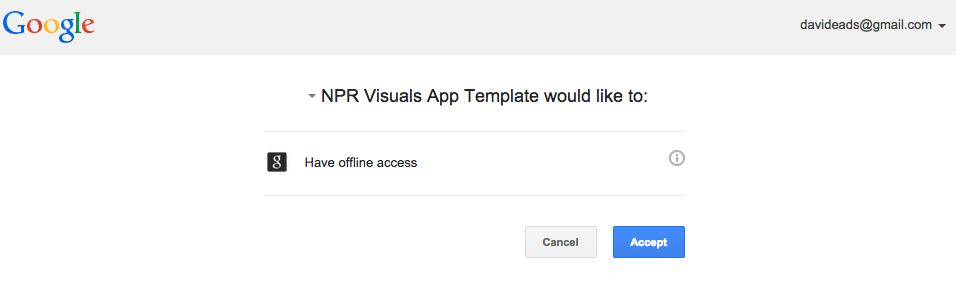
Google would like you to know what you’re getting into:

That’s it. You’re good to go!

Bonus: Automatically reloading the spreadsheet

Any route decorated with the @oauth_required decorator can be passed a refresh=1 querystring parameter which will force the latest version of the spreadsheet to be downloaded (e.g. localhost:8000/?refresh=1).

This is intended to improve the local development experience when the spreadsheet is in flux.

Behind the scenes

The new system relies on the awesome Authomatic library (developed by a photojournalist!).

We provide a decorator in oauth.py that wraps a route with a check for valid credentials, and re-routes the user through the authentication workflow if the credentials don’t exist.

Here’s an example snippet to show how it works:

from flask import Flask, render_template
from oauth import oauth_required

app = Flask(__name__)

@app.route('/')
@oauth_required
def index():
    context = {
        title: My awesome project,
    }
    return render_template(index.html, **context)

Authomatic provides an interface for serializing OAuth credentials. After successfully authenticating, the App Template writes serialized credentials to a file called ~/.google_oauth_credentials and reads them when needed.

By using the so-called “offline access” option, the credentials can live in perpetuity, though the access token will change from time-to-time. Our implementation hides this step in a function called get_credentials which automatically refreshes the credentials if necessary.

By default, credentials are global – once you’re authenticated for one app template project, you’re authenticated for them all. But some projects may require different credentials – perhaps you normally access the project spreadsheet using your USERNAME@YOURORG.ORG account, but for some reason need to access it using your OTHERUSERNAME@GMAIL.COM account. In this case you can specify a different credentials file in app_config.py by changing GOOGLE_OAUTH_CREDENTIALS_PATH:

GOOGLE_OAUTH_CREDENTIALS_PATH = '~/.special_project_credentials'

Finally, the Google Doc access mechanism has changed. If you need to access a Google spreadsheet that’s not involved with the default COPY rig, use the new get_document(key, file_path) helper function. The function takes two parameters: a spreadsheet key and path to write the exported Excel file. Here’s an example of what you might do:

from copytext import Copy
from oauth import get_document

def read_my_google_doc():
    file_path = 'data/extra_data.xlsx'
    get_document('0AlXMOHKxzQVRdHZuX1UycXplRlBfLVB0UVNldHJYZmc', file_path)
    data = Copy(file_path)

    for row in data['example_list']:
        print '%s: %s' % (row['term'], row['definition'])

read_my_google_doc()

Multivariate testing: Learning what works from your users at scale

Multivariate and AB testing are generally used to iterate on products over time. But what do you do when your product is always different, like the visual stories we tell?

For the past year, NPR Visuals has been iterating on a story format for picture stories that works like a slideshow, presenting full-width cards with photos, text and any other HTML elements. We have made various tweaks to the presentation, but since each story is substantially different, it’s hard to know definitively what works.

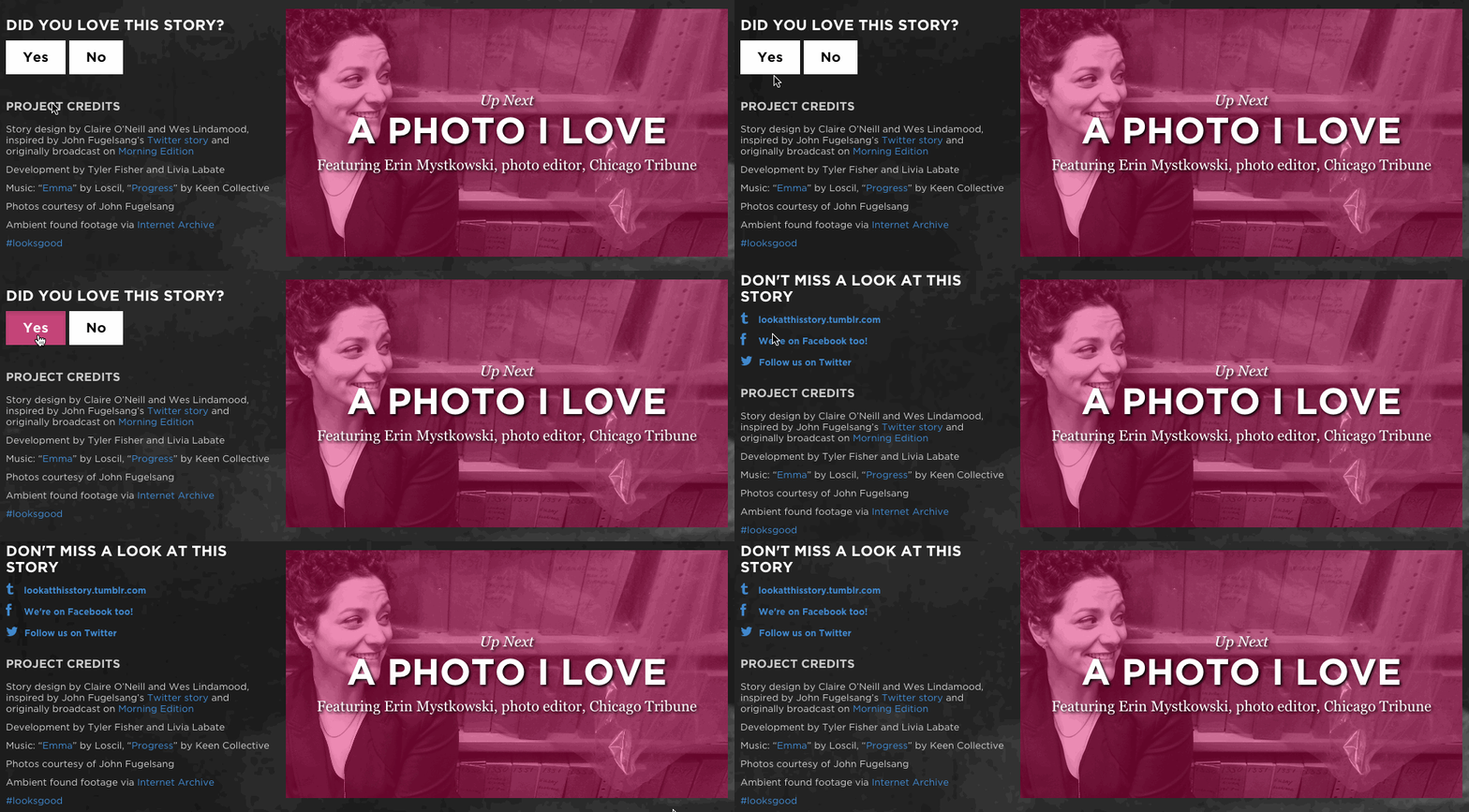
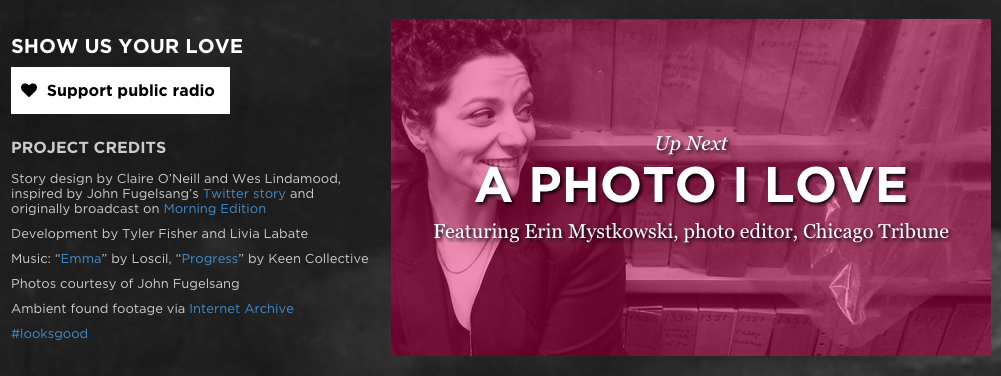
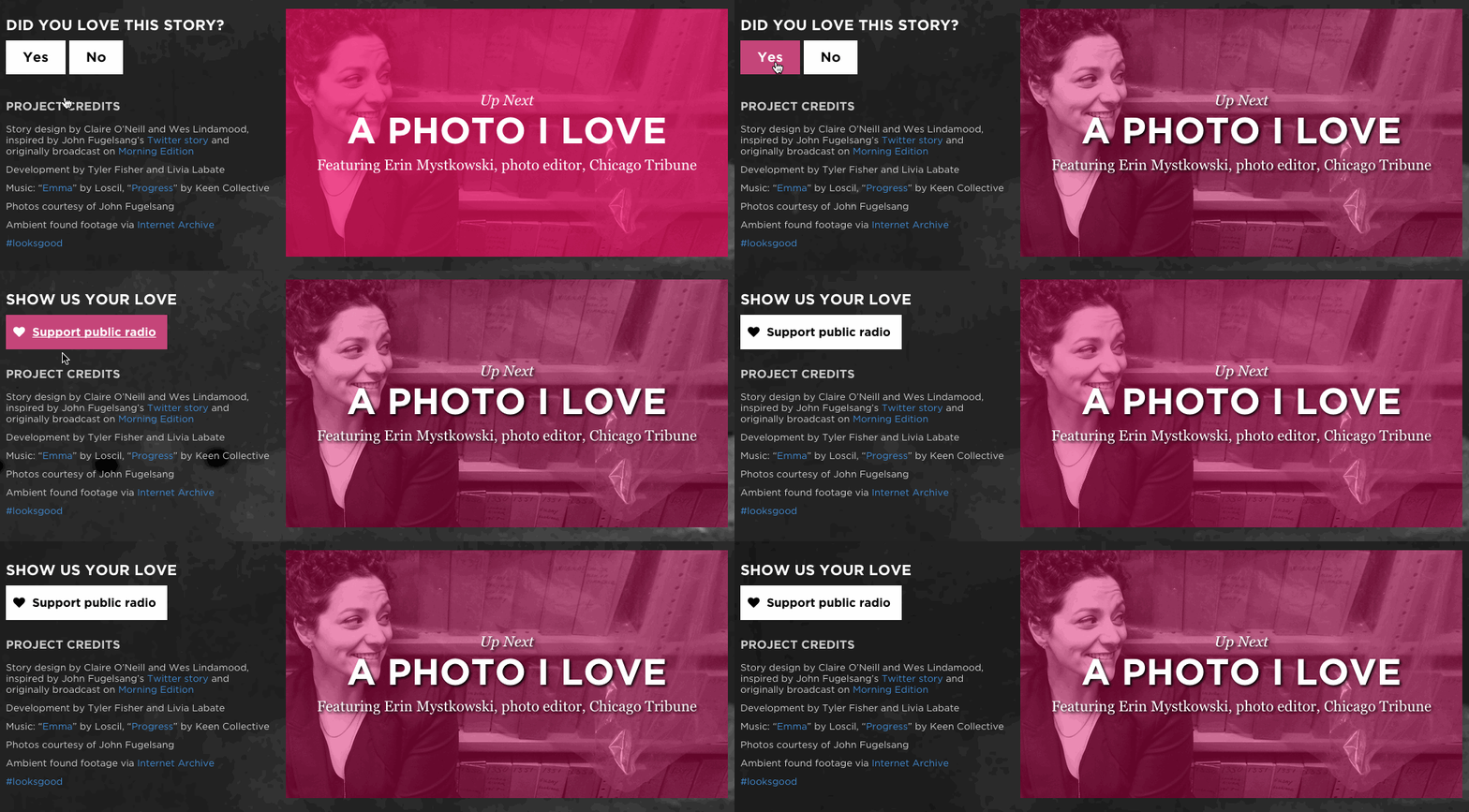
With three stories approaching launch in the middle of February (“A Brother And Sister In Love”, “Life After Death” and “A Photo I Love: Thomas Allen Harris”), we decided to test different ways to get a user to take action at the end of a story. We wanted to encourage users to support NPR or, in the case of “A Brother And Sister In Love” and “A Photo I Love”, to follow our new project Look At This on social media.

To find out, we conducted live experiments using multivariate testing, a research method that allows us to show users slightly different versions of the same page and assess which version people respond to more positively.

In multivariate testing, you determine a control scenario (something you already know) and form a hypothesis that a variation of that scenario would perform better than the control.

(Note: You will see the term multivariate testing, A/B testing or split testing to discuss experiments like this. While there is a technical difference between the implementation of these various methods, they all seek to accomplish the same thing so we are not going to worry too much about accuracy of the label for the purposes of discussing what we learned.)

In the control scenario we presented a user with a link to either 1) support public radio or 2) follow us on social media. We hypothesized that users would be more likely to take action if we presented them with a yes or no question that asked them how the story made them feel.

We call this question, which changed slightly on each project, the “Care Question”, as it always tried to gauge whether a user cared about a story.

The overall test model worked like this:
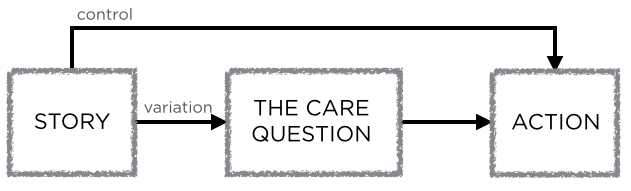
Test model

The test exposed two possible paths to users

When we ran the test, we showed half of users (who reached the final slide) the Care Question with two buttons, “Yes” and “No”. Clicking Yes brought them to one of the two actions listed above, clicking No revealed a prompt to email us feedback. The control group was shown the action we wanted them to take, without a preceeding question.

We were able to run these tests at about equal intervals with a small amount of code.

In this blog post, we will show the results, how we determined them and what we learned.

Process

When a user reached the conclusion slide, we sent an event to Google Analytics to log which set of tests ran.

We also tracked clicks on the “Yes” and “No” buttons of the Care Question, and clicks on the subsequent actions (support link, each of the follow links, and the feedback email link).
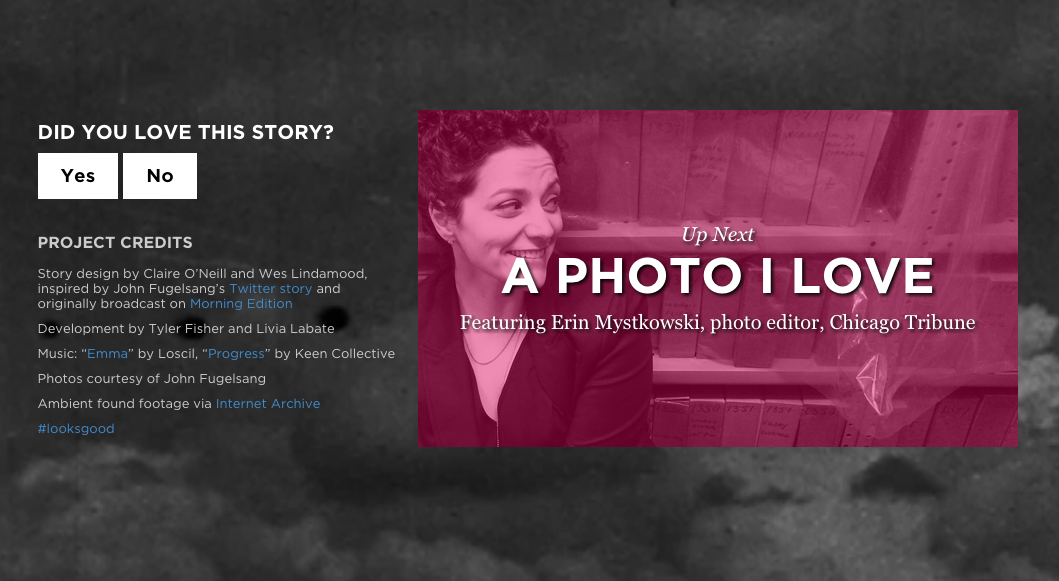
Example Care Question

The Care Question used in A Brother And Sister In Love

Determining whether the results were statistically significant required some pretty complex calculations, which you can read about here. Luckily, Hubspot provides a simple-to-use calculator to determine the statistical significance of your results.

Significance is determined by the confidence interval, or how confident you can be that your numbers are not determined simply by randomness. Usually, a 95% confidence interval or greater is high enough to draw a conclusion. Using the calculator, we determined whether the difference in conversion rates (where conversion rate is defined as clicks over the number of times a particular test was run) was statistically significant.

“A Brother And Sister In Love”

The test for “A Brother And Sister In Love” was actually two separate A/B tests at the same time: whether a user was prompted to follow Look At This on social media or support NPR by donating. For each scenario, users were prompted with the Care Question or not. The Care Question was “Did you love this story?”

This breaks down into two tests, a “follow test” and a “support test”, with a control and variation scenario for each:

Follow test, control
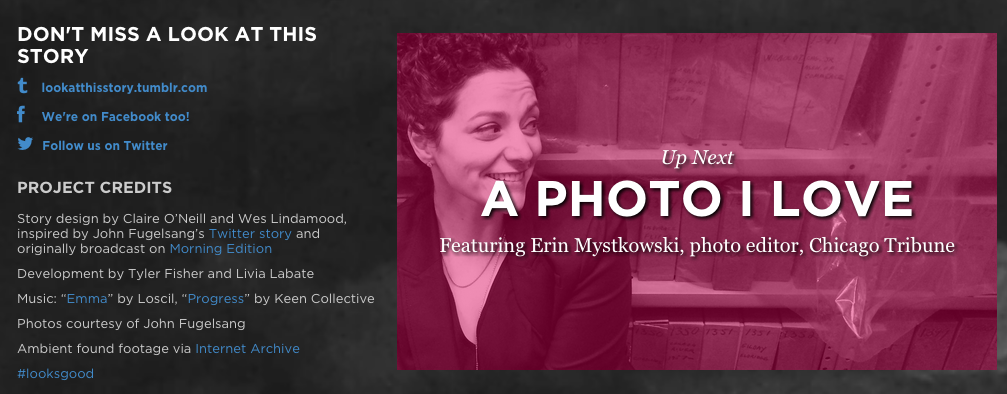
The follow prompt, no question beforehand

Follow test, variation

The follow prompt, no question beforehand

Support test, control

The support prompt, no question beforehand

Support test, variation

The support prompt, no question beforehand

Finally, if a user clicked no, we provided a prompt to email us feedback.
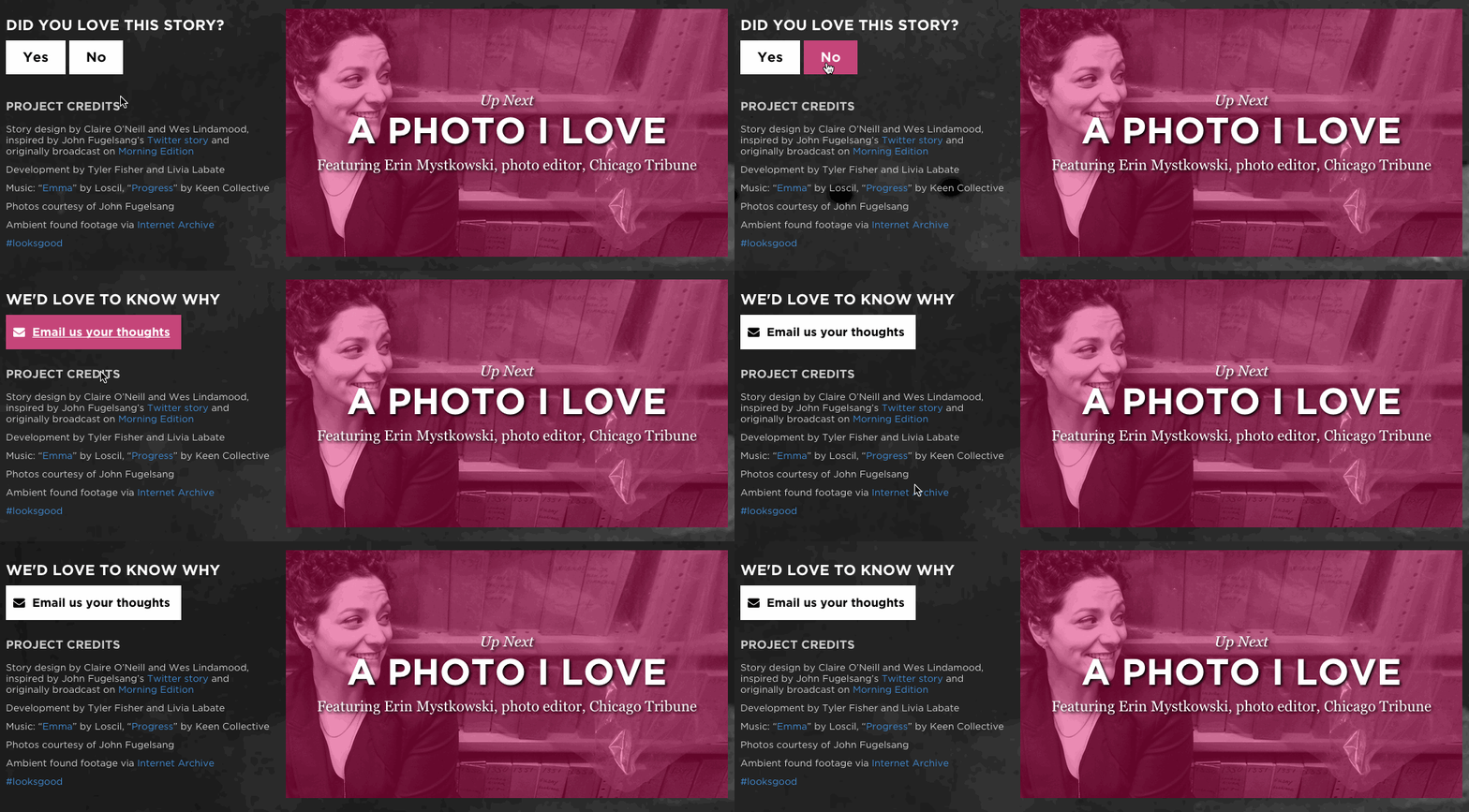
The support prompt, no question beforehand

If a user answered “No” to the Care Question, we asked them to email us feedback.

We were able to determine with 99.90% confidence that prompting a user with a question before asking them to “Support Public Radio” was more successful. We converted 0.184% of users who did not receive the Care Question and 1.913% of users who did, which makes a user who received the Care Question 10 times more likely to click the support link.

“Life After Death”

One week later, after we had seen the preliminary results of our test from “A Brother And Sister In Love”, we ran another test on “Life After Death”. This was not a story associated with Look At This, and there was not an equivalent NPR property to follow, so we decided to hone our test on converting users to the donate page.
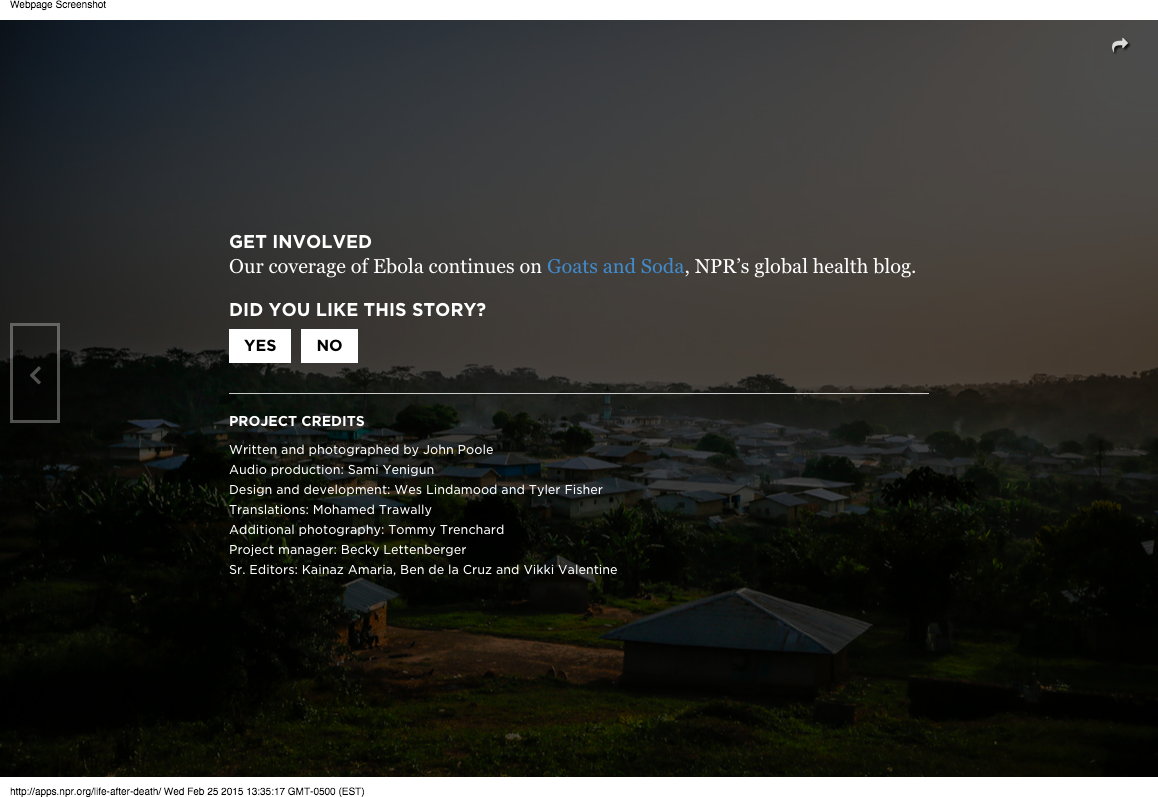
An example of one of our question variations

We wanted to confirm that users would convert at a higher percentage when presented with a Care Question first, so we kept the same control scenario. Instead of only using one question, we decided to run a multivariate test with four possible different phrasings. The control scenario and the four question variations each received ~20% of the test traffic. The four possible questions were:

  • Did you like this story?
  • Did you like this story? (It helps us to know)
  • Does this kind of reporting matter to you?
  • Does this kind of reporting matter to you? (It helps us to know)

For this test, we tested each question against the control scenario – presenting the user with a support button without showing them a question first.

Once again, we determined that presenting users with a Care Question before asking them to support public radio was a more successful path. Each of our four questions outperformed the control scenario at > 95% confidence intervals. Of the four questions, the two asking “Does this type of reporting matter to you?” were the best performers, which perhaps suggests that tailoring the Care Question to the content is the best course of action. Life After Death is a harrowing, intense story about a devastated village in Liberia, so perhaps asking a user if they “liked” a story was offputting in this case.

“A Photo I Love: Thomas Allen Harris”

A week later, we were able to run another test on a very similar story. It was a slide-based story that was also driven by the audio. We decided to rerun our original test, but fix our errors when logging to Google Analytics to create a better testing environment.
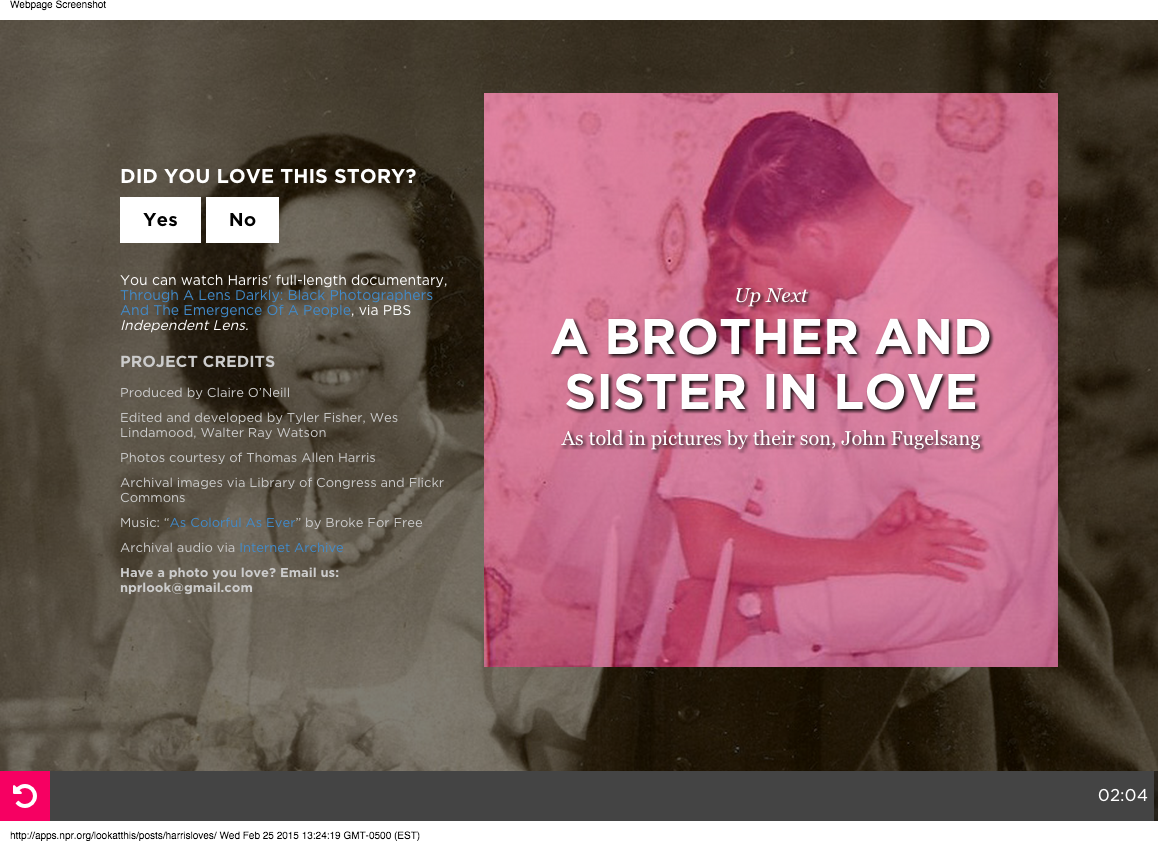
The Photo I Love conclusion slide

We left the same Care Question, “Did you love this story?”, and maintained our Look At This follow links.

Once again, we determined that giving users a question before a prompt to take action is a more successful path to conversion (1.7 times better for the Follow action and 13.5 times for the Support action).

Lessons Learned

We learned a lot in a short amount of time: some things about the stories themselves, a lot about the running of live tests and the math behind it. A few insights:

  • With our third test confirming that the Care Question has a positive impact on performance of actions presented at the end of stories, we feel confident implement this behavior by default going forward.

  • We also demonstrated that the language used to frame the Care Question matters. So far, aligning the tone of the question with the tone of the story has proven most successful.

  • Running the same test twice helped us simply validate that everything was working as planned. We are new to this, so it’s not a bad idea to double check!

  • Given the nature of the traffic for our stories (2-4 days of high volume followed by a long tail of decreased traffic), we need to make sure statistical significance is achieved within the first few days, as running a test for a longer period of time doesn’t add much at all.

  • Calculating the right sample size for a test is always a concern and particularly difficult when you don’t have a reliable cadance for what traffic to expect (since it varies from story to story), so we found we don’t need to do that at all. Instead, we can simply expose the entire audience for a story to the test we run and make the most of it as soon as possible.

  • We made several mistakes while analyzing the data simply because this is not something we do every day. Having multiple people look at the analysis as it was happening, helped us both correct errors and get a better understanding of how to make sense of the numbers.

  • Google Analytics automatically samples your default reports if your organization’s overall sessions exceed 500,000. To analyze tests like these you will want to make sure you have a full picture of your audience, so request an unsampled report (available from GA Premium only) so you can ensure your test is valid and reliable.

  • Also, with Google Analytics dropping support for custom variables, use distinct events to identify the variations of your test instead.

Work with us this summer!

Hey!

Are you a student?

Do you design? Develop? Love the web?

…or…

Do you make pictures? Want to learn to be a great photo editor?

If so, we’d very much like to hear from you. You’ll spend the summer working on the visuals team here at NPR’s headquarters in Washington, DC. We’re a small group of photographers, videographers, photo editors, developers, designers and reporters in the NPR newsroom who work on visual stuff for npr.org. Our work varies widely, check it out here.

Photo editing

Our photo editing intern will work with our digital news team to edit photos for npr.org. It’ll be awesome. There will also be opportunities to research and pitch original work.

Please…

  • Love to write, edit and research
  • Be awesome at making pictures

Are you awesome? Apply now!

Design and code

This intern will work as a designer and/or developer on graphics and projects for npr.org. It’ll be awesome.

Please…

  • Our work is for the web, so be a web maker!
  • We’d especially love to hear from folks who love illustration, news graphics and information design.

Are you awesome? Apply now!

What will I be paid? What are the dates?

The deadline for applications is March 20, 2015.

Check out our careers site for much more info.

Thx!

The Impact of Sustaining givers on Public Radio Fnd Drives


The movement to monthly sustaining givers has been good for many public radio stations, improving annual donor retention and monthly cash flow. The impact on fund drives is less clear.


There's not a lot of readily available national data on the subject, but we've seen mixed results across a few dozen client stations over the past three years. It appears the increase in sustaining members has reduced fund drive efficiencies for two reasons.

The pool of donors who might renew their membership during the drive is smaller because many of the most loyal donors are now sustainers. And additional gifts are a tougher sell since part of the sustainer pitch is that the listener is already supporting the station every month.

These two issues seem to have a greater effect on stations that ran efficient fundraising programs prior to seeking sustaining members. Stations that were less efficient to begin with get a longer grace period before their on-air drives are affected.

Perhaps a bigger issue now facing many stations is the multi-year impact of sustainer programs on fund drive cash flow. Every station has to manage the initial cash flow hit of starting a sustainer program. That's because the pledges that used to fulfill all at once now take 12 months to fulfill. The later in the fiscal year a sustainer is acquired, the less cash flow value that listener has in the current fiscal year.

In theory, the station is trading short-term fund drive cash for ongoing monthly sustainer cash. In practice, we are seeing stations trying to increase both. As a result, fund drive cash flow expectations are no longer being adjusted proportionately to sustainer pledges received during the drive. Drive goals are going up in a more difficult fundraising environment.

Here’s an example using a station with a drive goal of $300,000 in pledged dollars. Sorry about all of the numbers.

Prior to its sustainer program the station could count on $270,000 or more of that $300,000 to fulfill in the fiscal year. With a sustainer program, at least $100,000 of the pledged dollars are now being paid monthly (1/3 of pledged dollars).

If that drive occurs halfway through the fiscal year, then only half of the sustainer money fulfills in the fiscal year. That’s a $50,000 hit to fiscal year cash flow. Now only $220,000 fulfills in the fiscal year. Over three drives, on-air fundraising contributes $100,000 less per year to cash flow.

What we’re starting to see is that after the initial implementation of a sustainer program, stations aren’t willing to take that big of a cash flow hit on the fund drive revenue line. Rising budgets keep putting pressure on fund drives to deliver more immediate cash. So fund drive cash flow expectations are no longer being reduced deeply enough to account for sustainers. In some cases cash flow goals are approaching the same levels as the pre-sustainer drives. 

The consequence is that the station has to raise its overall fund drive goal to meet the cash flow projection for the drive. Going back to our example, to raise $270,000 in current fiscal year cash with the sustainer model, the drive goal now has to be $380,000. That’s 27% higher than the pre-sustainer model. In a tougher on-air fundraising environment.

As a rule of thumb, the more successful a station is with sustainers, the less reliant it must become on fund drives for cash flow. It also must become better at multi-year, multi-channel revenue planning. If it doesn’t, then drive goals must be increased with the understanding that getting more immediate cash out of a drive and getting more sustainers from that drive are conflicting goals.

The problem, as we are seeing it, is that an increasing number of stations want both and that's not working.

A few decades ago, when public radio was investing considerable resources in on-air fundraising research and training, I posed the question, "Pledge drive or Fund drive?” That is - is the main purpose of this drive to get donors or money? It is an important question that impacts fund drive strategy, tactics, and messaging.

It turns out that public radio's incredible audience growth over those decades made that question less important than we thought. Most stations picked raising money as their primary goal and got enough new members along the way to grow, even though the percentage of new member donations was quite low.* 

The success of sustainer programs and the importance of acquiring sustainers through on-air drives just might be making "Pledge drive or Fund drive?" a more relevant question today. 

---------

* New givers in most fund drives range from 25% to 35%. It has been that way for a few decades. Flip that number around and it means that 65% to 75% of givers during an on-air fund drive are already in the station’s donor database. These percentages are a result of focusing on raising money during drives over acquiring new givers.

It’s Taking More Leverage to Generate Pledge Drive Contributions

Our last post covered how it is getting more difficult to generate contributions during public radio pledge drives. We introduced the idea of public radio pledge drive Leverage.  (Pleverage?)

Leverage is the weight of the incentives offered to generate a contribution or to raise a dollar. Leverage is the stuff – premiums, challenge grants, dollar-for-dollar matches, sweepstakes – offered during the drive to spike response rates and influence average gift.

We’re still working on the best way to measure this, but it is an important concept.  On one hand, incentives are a cost to the station – financial and in terms of listener perception. We know from Listener-Focused Fundraising research that commercial-like fundraising tactics create negative perceptions among many listeners and that is a cost.

On the other hand, incentives create an important value proposition for an significant subset of potential givers. This post focuses on the idea of value proposition.

But Wait There’s More!

It used to be that using one incentive at a time was sufficient leverage to meet hourly and daily on-air drive goals. Sometimes two incentives, such as a premium and a dollar-for-dollar match were offered simultaneously. Now, more stations are offering more stuff, simultaneously, to meet their goals.

The questions before us are how much leverage is really necessary for a station to get the results it needs?  And, is there a point where so much leverage is needed to meet the pledge drive goal that it is a sign of an unrealistic goal?

In the interest of full disclosure our company, Sutton & Lee, provides on-air fundraising consulting services to nearly a dozen public radio stations. We are helping many of those stations use increased leverage to meet their goals.

Below is an example of what one major market station offered as sweepstakes prizes during a recent campaign. The example below is not one of our client stations but it represents how a handful of stations have been operating over the past decade and we think it represents where much of the industry is headed.
  • Trip for two to Paris
  • Tanzanian Safari for two
  • Trip to Iceland
  • WWDTM Trip to Chicago
  • Galapagos trip
  • Rome and Florence trip
  • Mercedes Benz
That’s something like $60,000 to $70,000 of prize incentives for just one pledge drive. The station also had several challenges and dollar-for-dollar matches ranging from $10,000 to $50,000. Additionally, a few premiums were set at “loss-leader” pledge levels to boost response rates.

Depending on when a listener was asked, the enticement to respond during this drive would have been entry into sweepstakes for multiple trips, a chance to win a Mercedes, a $50,000 challenge grant, and an attractively priced premium.

The value proposition to the listener is this:

“Give $10 per month now to get a great thank you gift at a special pledge level and also support the station you depend on so you can maintain access to your favorite programs. You’ll also get many chances to win a dream vacation and a chance to win a luxury car all while turning that $10 per month into a $50,000 challenge grant the station can earn if you do it by the end of the hour.”

While this might seem extreme to the outside observer, leaders at this station obviously felt all of these incentives were needed to meet the goal over their planned fundraising footprint. That’s a lot of leverage.

And this station is not alone. Many stations are giving away multiple trips. Others are giving away cars and even tens of thousands of dollars in cash.

It’s Not a Bake Sale Anymore

And it’s not just the sweepstakes that are getting extreme. Some stations offer “early bird” discounts on premiums, where the pledge level starts low and goes up later in the drive. While very commercial sounding, this technique does boost immediate response rates.

Some stations offer “two-for-one” matches where every dollar contributed generates two additional dollars in match money.  To the listener this is, “give $100 right now and the station receives an extra $200 donation from a generous major donor to the station. Right now your pledge has three times the buying power.”

These two-for-one matches can be very effective at generating immediate response. They are often four times more effective than incentive-free fundraising at generating contributions and dollars.

The value proposition of matches is also quite good from the listener perspective. Unlike a sweepstakes, which the listener may or may not win, there is an instant benefit to responding. The listener gives and the station gets even more. Instantly!

The primary downside of two-for-one matches for the station is that a dollar of leverage returns just 50 cents in revenue. The pledges come in faster, which is good, but the cash return on the leverage is lower than the value proposition to the listener.

We’ve seen stations raise less money in an entire day than they used for a two-for-one match during that day. For example, $30,000 in match money generates $15,000 in contributions over a few hours. Then the rest of the day generates $10,000 in pledges. The daily pledge total is $25,000 but it took $30,000 in match money to get it.

It’s a reasonable argument to point out that the any match or challenge in a pledge drive is worthwhile because the station leveraged the pledge drive to obtain the match money commitment in the first place. We agree. That’s one of the great strategic benefits of matches and challenges. They raise money twice for the station, once before the drive and once during the drive.

But from the potential donor’s perspective a two-for-one match is the antepenultimate pledge drive offer. It’s big leverage. The only thing that makes it better is getting a discounted premium and a chance to win a great sweepstakes prize while getting your gift tripled.

Circling back to the big question in front of us, “how much leverage is too much?”

Are we at the point where meeting goals requires offering incentives worth more than the value of the contribution itself?  Is there an ideal ratio of pledge drive dollars to incentive value.

Defining leverage in this way could help underperforming stations get better results or at least better manage their expectations. It could also help stations efficiently meet their goals without going overboard.

Another benefit is improved pledge drive benchmarking. It’s almost impossible to compare results across stations without considering the leverage applied at each station.

Finally, we can’t leave this discussion without asking if there is a point where greater reliance on commercial tactics makes pledge drives even less-listenable and/or erodes the bond between the station and listeners who value the non-commercial nature of public radio. 

Four Diverse Media Startups Win Encore Entrepreneur Funding

Posted To: Press Releases

For immediate release
Feb. 5, 2015
Contact: Jan Schaffer
jans@j-lab.org

Washington, D.C. – Four media startups proposed by entrepreneurs over 50 have been selected to receive $12,000 each in encore media entrepreneur funding, J-Lab announced today. The projects are a single-topic magazine on Medium.com, a Connecticut hyperlocal FM/streamed radio station, daily Internet radio newscasts and podcasts for a Pacific Northwest blog network, and an Hispanic crowd-sourced initiative on border-crossing deaths.

The four initiatives were among 82 applications received in J-Lab’s Masters Mediapreneurs initiative to help seed media startups launched by Baby Boomers, aged 50-plus. 

“We could easily have funded several more worthy projects,” said J-Lab director Jan Schaffer. “The ideas were creative, the energy striking, and the applicants’ eagerness was quite pronounced.”

“Many who applied tipped their hats to this opportunity to validate ideas from mature news creators and help them make them happen.”

The winners are: 

Midcentury/Modern, an online magazine “following Boomers into their Third Act,” launched in late December by hyperlocal news entrepreneur Debra Galant, the founder of Baristanet and now director of the NJ News Commons. Instead of creating a stand-alone website, the magazine is publishing on Medium, a social journalism blogging platform that allows people to recommend and share posts Twitter-like. It is one of the first publications receiving independent funding to launch on Medium, which is also offering technical and revenue support. “This online magazine explores how the definition of aging shifts when it happens to the cohort that defined itself by its youthfulness,” Galant said.

The LP-FM New-Media Newsroom, a new FM/web-streamed radio station for New Haven, CT, shepherded by New Haven Independent founder Paul Bass in partnership with La Voz Hispana, the local Spanish-language weekly. Daily four-hour news programs, to start, will be in English and Spanish and feature local African-American hosts. “We're excited about launching an FM/web-streamed community radio station in the fall,” Bass said. “We envision this as one model for not-for-profit, public-interest local news sites like ours to expand on the journalism we do and broaden our racial and ethnic makeup and outreach.”

SoKing Internet Radio, daily newcasts to feature content from South King Media company’s six community blogs covering South King County near Seattle. Scott Schaefer, founder of the B-Town Blog and South King Media is leading the project. “This will allow us to start up a truly innovative new program – daily hyperlocal newscasts that will live not only on our 24/7 streaming radio station, but also as podcasts posted to South King Media’s six local blogs and Facebook pages,” Schaefer said.

EncuentrosMortales.org, a Spanish-language website and database to collect public records and media reports of undocumented people killed during interactions with law enforcement officers along the southern border of the U.S. It is a project of D. Brian Burghart, who created an English version, FatalEncounters.org, and is editor and publisher of the Reno News & Review. “I’m very excited to be able to move forward with EncuentrosMortales.org.  Law-enforcement-involved homicides along the U.S. border is an important and underreported issue, and I hope we can bring together technology, languages and volunteers to get a much better idea of our government’s activities,” he said.

The Masters Mediapreneurs progam is funded with grants from the Ethics and Excellence in Journalism and the Nicholas B. Ottaway Foundations.

Participating in the judging the applications were Ju-Don Roberts, Director of the Center for Cooperative Media, Montclair State University; Tiffany Shackelford, Executive Director, Association for Alternative News Weeklies; Jody Brannon, Digital Media Strategist and former National Director News 21, and Jan Schaffer, Executive Director, J-Lab.

J-Lab, founded in 2002, is a journalism catalyst. It funds new approaches to news and information, researches what works and shares practical insights with traditional and entrepreneurial news organizations. Jan Schaffer is also Entrepreneur in Residence at American University.


RadioSutton 2015-02-03 02:52:00

It’s getting harder to generate contributions through public radio pledge drives.  Most stations are still getting good overall results, but the cost of getting those results is going up.

Sometimes the cost is more on-air fundraising. It is taking more of the station’s time and more of the listeners’ time to generate a contribution. Sometimes the cost is greater leverage. That is – stations are having to offer more, or more expensive, incentives to generate a contribution.

Probable Causes

Success with monthly Sustaining givers appears to be having an effect on drives by cutting into the potential number of annual renewals received during the drive. Declining AQH (Average Quarter-Hour) audience is another possible cause. Lower AQH means listeners are using the station less. That could result in listeners being less likely to give.  It certainly reduces the number of potential respondents to an on-air fundraising appeal.

There could be external factors as well. People are being asked to immediately part with their money at unprecedented rates these days. The junk mail and telemarketing calls of 25 years ago now follow us out of our homes and find us 24/7. The amount of daily asks is numbing. Public radio pledge drives appeals are fighting through much more clutter just to be considered let alone acted upon.

Measuring Pledge Drive Success

The primary metric we use to measure on-air fundraising success is Listener-Hours to Generate a Contribution. Using Nielsen Audio audience data, we answer the question, “how many hours of listening must we expose to fundraising to get someone to give?”

Or, put another way, how efficiently are we spending our listeners’ time to get a single contribution? A lower number is better. The goal is to maximize the pledge drive return against the expense of the disrupting the listening experience.

In a PPM-measured market, an efficient pledge drive for an NPR News station generates one contribution for every 300 hours of listening exposed to fundraising. That’s like putting 300 people in an auditorium and playing public radio content for an hour, except that their experience will be interrupted 4 to 5 times in that hour with 4 to 6 minute fundraising appeals. At the end of that hour, one of the 300 people will make a contribution in the amount of an average gift.

Two Trends

We see on-air fundraising following two trends. Some stations are adding more fundraising hours and exposing more listening to pledge drives to meet their goals. The fundraising efficiency metrics at these stations don’t improve, they get worse. The stations still meet their goals, or come relatively close, by applying more brute force.

The other trend involves applying more Leverage to the fundraising ask. We haven’t settled on exactly how to best measure Leverage, but we believe the broader concept is sound. For now, consider the Leverage to be the weight of the incentives offered to generate a contribution or to raise a dollar.

Here’s an example. Ten years ago a station offers a dollar-for-dollar match and the fundraising efficiency is 150 Listener-Hours (LH) per Contribution. That means the match is twice as efficient as the average hour of fundraising, which took twice as many LHs (300) to generate a contribution.

Today that match has an efficiency of 200 LHs per Contribution. It’s less efficient at turning listening in to contributions. So the station decides to offer a free tote-bag to anyone who gives during the match in addition to any other thank you gift they take. More listeners respond to the offer and the efficiency returns to its prior number of 150. The station achieved its prior efficiency by applying more Leverage.

This is happening at a lot of stations across the country stations. They are offering more incentives each drive and offering more of them  simultaneously to maintain fundraising efficiencies.

Is the Problem Too Much Talk About Stuff and Not Enough Talk About Mission?

Probably not.

Mission messages are great for convincing listeners that they should give to the station but they aren’t particularly effective at motivating people to actually pause their busy lives to give at that moment. The well-executed “Mission” focused fundraising hours tend to fall in the 400-500 LH efficiency range.

A pure Mission approach to pledge drives would likely require a plan that exposed listeners to 33% to 50% more fundraising to meet the overall drive goal. That’s like turning a 9-day pledge drive into a 12 to 14-day pledge drive. As you might imagine, longer drives tend to drive efficiencies down even more.

What’s Next?

Subsequent postings on this topic will go a little deeper into Leverage, Sustainers, and off-air fundraising including the use of email, social media and database solutions.

One final note. In the past we’ve observed that public radio might have more of a spending problem than a fundraising problem. The money stations are spending on increased local news offerings and digital initiatives is outpacing their ability to monetize those activities. They are currently money losers. That puts pressure on the core radio service to generate “profits” to subsidize those activities.

One of the possible answers to slipping pledge drive efficiencies is to reduce the revenue burden they must bear through smarter spending on local news and digital.

Baking Chart Data Into Your Page

Do you use our dailygraphics rig to create and deploy small charts? We’ve introduced a new feature: The latest version of copytext.py (0.1.8) allows users to inject serialized JSON from a Google Spreadsheet onto their page with one line of template code.

Benefits:

  • Store your text and your data in the same Google Spreadsheet, making editing a little simpler.
  • The data is baked right into your page, so there’s one fewer file to load.

(Thanks to Christopher Groskopf and Danny DeBelius for making this work.)

If you’re already using dailygraphics, pull the latest code from GitHub (we’ve updated libraries and made other bugfixes in recent weeks), and update requirements:

pip install -Ur requirements.txt

You can see this at work in a graphic published today on NPR.org.


Here’s How It Works

The following examples assume that you are using our dailygraphics rig. Both examples point to this Google Spreadsheet.

The spreadsheet has three tabs:

  • labels: Text information (headline, credits, etc.)
  • data_bar: The data for the bar chart example below
  • data_line: The data for the line chart example below

Note: Copytext works best when all values (even numeric ones) are cast as text/strings in the Google Spreadsheet, rather than numbers or dates. You can convert them to their proper types later in JavaScript.


Bar Chart (Source code on GitHub)

In child_template.html, add a <script></script> tag above all the other JavaScript embeds at the bottom of the page, and then declare the variable for your data.

<script type="text/javascript">
    var GRAPHIC_DATA = {{ COPY.data_bar.json() }};
</script>
  • GRAPHIC_DATA is the variable name you’ll use to reference this data
  • COPY refers to the overall spreadsheet
  • data_bar is the name of the specific sheet within the spreadsheet (in this case, the spreadsheet has three sheets)

The result looks like this, with the keys corresponding to the column headers in the table:

<script type="text/javascript">
    var GRAPHIC_DATA = [{"label": "Alabama", "amt": "2"}, {"label": "Alaska", "amt": "4"}, {"label": "Arizona", "amt": "6"}, {"label": "Arkansas", "amt": "8"}, {"label": "California", "amt": "10"}, {"label": "Colorado", "amt": "12"}, {"label": "Connecticut", "amt": "14"}];
</script>

In js/graphic.js, don’t bother with declaring or importing GRAPHIC_DATA — just go straight to whatever additional processing you need to do (like, in this case, explicitly casting the numeric values as numbers).

GRAPHIC_DATA.forEach(function(d) {
    d['amt'] = +d['amt'];
});

Line Chart (Source code on GitHub)

In child_template.html, add a <script></script> tag above all the other JavaScript embeds at the bottom of the page, and then declare the variable for your data.

<script type="text/javascript">
    var GRAPHIC_DATA = {{ COPY.data_line.json() }};
</script>
  • GRAPHIC_DATA is the variable name you’ll use to reference this data
  • COPY refers to the overall spreadsheet
  • data_line is the name of the specific sheet within the spreadsheet (in this case, the spreadsheet has three sheets)

The result looks like this, with the keys corresponding to the column headers in the table:

<script type="text/javascript">
    var GRAPHIC_DATA = [{"date": "1/1/1989", "One": "1.84", "Two": "3.86", "Three": "5.80", "Four": "2.76"}, {"date": "4/1/1989", "One": "1.85", "Two": "3.89", "Three": "5.83", "Four": "2.78"}, {"date": "7/1/1989", "One": "1.87", "Two": "3.93", "Three": "5.89", "Four": "2.81"}, {"date": "10/1/1989", "One": "1.88", "Two": "3.95", "Three": "5.92", "Four": "2.82"} ... [and so on] ...;
</script>

In js/graphic.js, don’t bother with declaring or importing GRAPHIC_DATA — just go straight to whatever additional processing you need to do (like, in this case, explicitly casting the dates as dates).

GRAPHIC_DATA.forEach(function(d) {
    d['date'] = d3.time.format('%m/%d/%Y').parse(d['date']);
});

Related Posts

Putting Radio On The Television

For election night 2014, we wanted to do something different.

We guessed that the dedicated wonks — the ones who want to drill down into detailed data and maps — would probably go to sources like the New York Times or Washington Post. Rather than reproduce that work, what could NPR do that would be unique, and would serve a broader audience?

To start, we had our organization’s thoughtful reporting and on-air coverage — a live event we could build something around. We had the results “big boards” we make every election year for the hosts in the studio (and shared publicly in 2012 — a surprise success). We had a devoted audience.

So we decided to throw a party — and put radio on TV.

We built an app that people could pull up on their TVs or laptops or mobile phones and leave on in the background during their election parties. We imagined users muting cable news and listening to us instead — or even replacing cable news entirely for some users. We built in Chromecast support and made reaching out to cord-cutters part of our marketing pitch.

Did it work? Here’s what we learned.

Note: The usage figures cited below refer to a one-day slice of data: Nov. 4, 2014 (EST). The practice of measuring web usage is an inexact science — time on site is particularly problematic — so all of these figures are best read as estimates and used for relative comparison, not absolutes.

Traffic / Usage

Average Time On Site (Per Session)
Overall 7 minutes, 01 second
Desktop 10 minutes, 19 seconds
Tablet 5 minutes, 52 seconds
Mobile 2 minutes, 57 seconds
Devices (Share of Unique Pageviews)
Desktop 54.5%
Mobile 33.6%
Tablet 11.9%
Top Browsers
Chrome 41.1%
Safari 21.8%
Safari (in-app) 17.5%
Firefox 11.5%
Internet Explorer 5.0%

(Chrome usage likely also includes Chromecast. Safari (in-app) figures reflect users opening links within iOS apps, such as Twitter and Facebook.)

Browser usage of our app generally tracked with that of the overall NPR.org site. Exceptions: The share of Chrome users was a few percentage points higher for our app; the share of Internet Explorer users, a few percentage points lower.

Non-Interactivity

This project involved a lot of a little experiments aimed at answering one larger question: Will users appreciate a more passive, less-interactive election night experience?

As it turns out, this is a remarkably difficult thing to measure. We can’t know if our users put their laptop down on the coffee table, if they were with friends when they used it or if they plugged their laptop into their TV. Instead, we have to make inferences based on session duration and our relatively meager event tracking.

Overall, the feedback we received was quite positive. We prompted people to email us, and most of the folks who did so said they were happy with the experience.

Slide Controls

Although we optimized for a passive user experience, we needed to include some controls. From the very beginning our stakeholders asked for more control over the experience. We made an effort to balance this against our belief that we were building more for a distracted audience.

For passive users, each slide included a countdown spinner to signal that the display would change and to indicate how much time remained until the app would auto-advance to the next slide.

For more active users, we included “previous” and “next” buttons to allow users to skip or return to slides. 27 percent of users clicked the “next” button at least once to skip, while 18 percent used the “previous” button. 11 percent figured out that they could skip slides using their keyboard arrow keys. (We didn’t include any clue to this feature in the UI.) About a third of those who emailed us said they would have liked even more control, such as a pause button.

Audio Controls

The live radio broadcast would auto-play when users entered the app. 8 percent of users clicked the mute button. (Not including users who may have used the audio controls on their devices.)

Personalization

We guessed that, in addition to national election results, users might also want to see results for their state.

Our original plan was to ask our users to choose their state when they arrived. But as we learned from user testing and fine-tuned the welcome process, we killed the intermediary “pick your state” screen. Instead the site would guess the user’s location, and users could change their state via the controls menu.

6 percent of users interacted with the state dropdown. The list of top states users switched to hints at interest in certain contentious races (Senate seats in Kentucky and Colorado, for example), regardless of where the user was actually located.

  • Kentucky
  • Colorado
  • California
  • Florida
  • Arkansas

We heard feedback that some users who did use the dropdown were unsure of its purpose. If we had more time, we might have put more time into this feature. We hoped that if our attempt at presenting location-specific results worked seamlessly for most users, it would be okay.

The Chromecast Hypothesis

Our working theory was that Chromecast users would be the most passive in their interaction with the app — likely throwing it up on the TV and just letting it run — and therefore they would spend more time with it. And that theory held true: Chromecast users spent an average of 19 minutes and 53 seconds on the site (compared to the overall average of 7 minutes and 1 second).

That said, the Chromecast audience was pretty small: In only 0.7 percent of visits did a user initiate a Chromecast session by clicking on one of our “Cast This” buttons. (This does not include users who may have cast the page using the Chrome browser extension.) But we heard from many Chromecast users who seemed very excited that we built something for them: 15 percent of the feedback emails we received and 13 percent of tweets talking about the app mentioned Chromecast.

(We originally intended to also support Roku and AirPlay “casting,” but the native Chromecast experience proved to be far superior to the “mirrored” offered by other devices. We hope to continue experimenting in this arena.)

On a related note, one surprise: 3 percent of users clicked the fullscreen button — more than double our Chromecast users. And these users stayed on the site even longer, an average of 31 minutes, 38 seconds.

Conclusion

This project gave us some useful insights into how users interact (or not) with an app designed to be experienced passively.

We also learned a lot about user analytics, from what behavior to track to how to query for results. Our insights were limited somewhat by the tools we had and our ability to understand them — Google Analytics can be pretty opaque.

On all these counts, we’ll continue to try new things and learn with future projects. We look forward to refining this experiment as we plan for the 2016 elections.

The Official PRPD Transition

As I leave the office for the last time as PRPD President, just want to thank you all for 8 great years in that job and over 36 wonderful years in public radio.  PRPD is now in the capable hands of Jody Evans... and, of course, the PRPD board.

My own plans are to take a little time to kick back but remain open to selected advising and consulting projects.  Hope I'll get to work with some of you in my "semi-retirement".

Happy New Year to all and all the best wishes for a thriving future.

Arthur Cohen

PRPD Office Move in Progress

As the year end approaches, PRPD files and records are "in the mail" from Hamilton, NY to Asheville, NC - the new World HQ of PRPD.  Jody Evans is now on board and officially becomes new PRPD President next week - Thursday, January 1, 2015.

As of January 1, the new PRPD contact info will be:

PRPD
150 Hilliard Ave.
Asheville, NC  28801
(802) 373-7934
info@prpd.org


Responsive Graphics In Core Publisher With Pym.js

Editor’s Note: Core Publisher is a content management system that staff at many NPR member stations use to maintain their websites. This post is written for that audience, but may be useful for users of other CMSes.

Over time, many member stations have created maps, graphics and other projects for their websites that were sized to fit Core Publisher’s fixed-width layout. But with the responsive mobile-only sites, and Core Publisher going to a fully responsive design, these elements either don’t work or won’t resize correctly to the screen.

Now you can use Pym.js to iframe responsively-built projects within Core Publisher stories.

(Note: NPR Digital Services, the team behind Core Publisher, doesn’t maintain or support Pym.js and can’t help you use it. But they didn’t raise any concerns about this workaround.)

I Was Ready Yesterday, What Do I DO?

I like that enthusiasm. First of all, let’s get a few assumptions out of the way: We’re assuming you are familiar with working in Core Publisher, know the post building process, comfortable with working in the source code view in the WYSIWYG with HTML, and that you have a separate web space to host all of your files (KUNC, like the NPR Visuals team, uses Amazon’s S3 service).

1) Download Pym.js.. Follow the instructions to integrate it into your project. (In Pym.js terms: Your project is the “child” page, while the Core Publisher story page it will live on is the “parent” page.)

2) Publish your project to the service of your choice. Note the URL path: You’ll need it later.

3) Build a post as normal in Core Publisher and then switch to the source code view and locate in the code where you want to place your iframe.

4) Core Publisher often strips out or ignores tags and scripts that it doesn’t recognize when it publishes. We’re going to get around that by using tags that CP does recognize. We’ll use Pym.js’s “auto-initialize” method, rather than inline JavaScript, to embed our project on the page. But, contrary to the example code in the docs, don’t use <div> tags to indicate where the iframe will go — use <p> tags instead. You’ll also need the URL path to your project from step 2: That will be your data target. The tag will look like this: <p data-pym-src="http://example.com/project/"></p>. Your target code for the iframe should look something like this:
<p>Bacon ipsum dolor amet cupim cow andouille tenderloin biltong pork belly corned beef meatball swine pastrami alcatra.</p>
<p data-pym-src="http://example.com/project/">&nbsp;</p>
<p>Cupim beef ribs ribeye swine tail strip steak drumstick venison bacon salami pig chicken.</p>

Beware: Core Publisher often will ignore paragraph tags <p> that are empty when it publishes. To avoid this, insert a non-breaking space &nbsp; between the opening and closing <p> tags for your pym target. Sometimes the CP WYSIWYG hobgoblins will insert this for you as well.

5) Next, point to the Pym.js script file. <script> tags are sometimes hit-or-miss in Core Publisher, so you should save your work right now.

(Note: If you’re embedding multiple Pym.js iframes on a page, you only need to include this script tag once, after the last embed.)

6) Did you save?

7) Good, let’s place that script tag now. It should follow the last iframe target in your post and should only appear once. You’ll need your URL path to pym from step 2. The full tag will look like this: <script type="text/javascript" src="http://example.com/project/js/pym.js"></script>.

8) Your complete code should now look like this:

<p>Bacon ipsum dolor amet cupim cow andouille tenderloin biltong pork belly corned beef meatball swine pastrami alcatra.</p>
<p data-pym-src="http://example.com/project/">&nbsp;</p><script type="text/javascript" src="http://example.com/project/js/pym.js"></script>
<p>Cupim beef ribs ribeye swine tail strip steak drumstick venison bacon salami pig chicken.</p>

Most of the time the script tag should be fine since it is a simple one — only the tag and URL, and no other arguments. Sometimes Core Publisher will still strip it out. This should be the last thing you place in your post before you save to preview or publish.

If you go in later and edit the post, double-check that the script wasn’t stripped out.

A good sign that the script wasn’t dropped? The following text might appear in the normal WYSIWYG text view: {cke_protected_1}. Don’t delete it: That’s script code.

Take a look at your post and revel in how cool that Pym.js-inserted element is. Or take a look at this example or this one.

What Gives? Your Example Isn’t On The Responsive Theme.

We’ll be transitioning to the responsive design in a few months. In the meantime, KUNC has a lot of legacy iframes that we’ll be going back to and embedding with Pym.js. And Pym.js works like a champ on the already-responsive mobile site, so these projects will work better for the quickly-growing mobile audience. Always think mobile.

So, Does It Work On The Responsive Theme?

It sure does! Anna Rader at Wyoming Public Media was kind enough to let me try a Pym.js test post on their newly-transitioned responsive site. Everything worked like a charm and there was much excitement.

Will The Pym Code In A Post Carry Over The API For Station-To-Station Sharing?

I haven’t tested this yet. If you’d like to be a test subject, let me know and we can give it a try. Looking at the raw NPRML in the API for a post with the pym code it in, it all seems to be there.

Have any questions? Find me on Twitter @ejimbo_com and ask away.

Improving User Engagement Through Subtle Changes: Updating the Book Concierge

The NPR year-end 2013 Book Concierge was a big hit. Instead of writing a bunch of lists, the books team solicited over 200 short reviews by critics and staff and put them into a single, beautiful website designed to make discovering great books fun. Readers loved it. For the 2014 Book Concierge, our goal was to build on last year’s success and resist the urge to rewrite the code or wildly redesign.

This is a catalog of small improvements, why we made them, and the difference they made. We’re using analytics for the first five days following the site’s launch. Overall, pageviews are slightly down from last year (337,000 in the first five days in 2014 versus 370,000 in 2013), but engagement appears to have increased fairly significantly.

Tag Styling

In the 2013 concierge the list of tags blends together, making them difficult to scan. To improve the tags’ legibility and click-ability, we tried different color combinations and styles with varying success. We tried alternating between 2 tag colors, as well as varying the tag length, but neither were satisfying.

Our final solution was to apply a color gradient over the list of tags. This transformed the tags into individually identifiable buttons that still feel like a cohesive unit. This year, there was an average of 2.7 tag selections per visit versus 2.3 in 2013, a 17% increase. In 5 days, about 86,000 people clicked the most popular tag (NPR Staff Picks), up from about 75,000 in 2013.

2013

2014

Modal Improvements

We changed the modal design to help encourage users to read more book reviews. We replaced the modal’s ‘previous’ and ‘next’ buttons — which were tucked away at the bottom of the review — with side paddles. This allows viewers to easily click through the reviews without having to hunt for the buttons at the bottom of each review. We also changed the modal proportions so that it fits into a wider range of screen sizes without forcing the user to scroll. By putting a max-width on the modal and limiting the book cover image size, we eliminated a lot of dead white space which improves the user’s reading experience. We believe these changes worked. This year, users viewed an average of 3.7 reviews per visit, up 54% from 2013.
2013

2014

Filter Button Location

In the 2013 concierge the filter button is positioned in the header above the ad on mobile devices, leaving a gap between the button and the book grid. In the 2014 version, we moved the filter button under the ad below the header, grouping the button with the content that it affects. Although the tag usage per viewer on mobile is similar for both years, we thought that this change created a more organized layout.

2013

2014

Social Buttons

We wanted to help users share their favorite books and reviews, so we added share buttons to the book modal. In the first 5 days, 6,110 reviews were shared through email, followed by facebook (2,866), pinterest (2,091) and twitter (559).

Links to Previous Years

It would have been cool to combine 2013 and 2014 into one big concierge, but we didn’t have time for that. We still wanted to reference last year’s concierge, as well as book lists from previous years, so we added these links to the header. Additionally, we added a link below the tags list to catch people who skipped past the header. On launch day, the 2013 concierge got 20,330 pageviews driven by the 2014 page.

2014

Lighten page load, improve performance

We’ve been able to realize significant performance gains in recent projects by using custom builds of our libraries and assets. We shaved over 300kb off the initial page load by using a custom icon font generated with Fontello rather than including all of Font Awesome. To further lighten the load, we dropped a few unnecessary libraries and consolidated all our scripts into a single file loaded at the bottom of the source.

In 2013 each book had two images, a thumbnail for the homepage and a bigger version for the modal. This year, we cut the thumbnail and aggressively optimized the full-size cover images. The page weight is almost identical, but instead of loading a thumbnail for the cover and a full sized cover when looking at a review, only a single image is loaded. This makes load time feel faster on the homepage, and helps load the reviews faster.

We also disabled CSS transitions at small viewport sizes to improve mobile performance and dropped all CPU intensive 3D CSS transitions.

Responding to users after launch

Finally, some librarians suggested to NPR Books that next year we should include a link to Worldcat, a site that will help you find a book at your local library.

2014

We thought this was a lovely idea and didn’t see why it needed to wait. So we used the Online Computer Library Center identifier API to get the magic book identifier used by Worldcat and added a “find at your library” link the day after launch. This quickly became the second most clicked exterior link after the “amazon” button.

It’s always awesome to make librarians happy.

Nielsen: Milennials DO Listen to Radio

A new Nielsen report, THE MEN, THE MYTHS, THE LEGENDS: WHY MILLENNIAL “DUDES” MIGHT BE MORE RECEPTIVE TO MARKETING THAN WE THOUGHT reports that:
Millennial men are also heavy music listeners. Eighty-eight percent of all Millennial males in the U.S. listen to radio each week, spending more time than their female counterparts tuned in (11 hours and 42 minutes vs. 10 hours and 46 minutes). They also show greater interest in personalized streaming audio services—think Spotify or Pandora—than other demographics.
Not surprisingly, they are major digital users:
Millennial males spend less time on average each week consuming traditional TV—only 20 hours, compared to 23 hours for Millennial females, 28 hours for Gen X males and 38 hours for Boomer males. However, they make up much of the difference online. This group spends significantly more time per week (2 hours 15 minutes) than any other demographic watching videos on the Internet

Thompson to Atlantic, Wilson to NY Times

More news about NPR staff (current and former) this week.  

Matt Thompson
1) Matt Thompson will be leaving NPR to become Deputy Editor of The Atlantic. Matt was NPR's Director of Vertical Initiatives  (and Mischief).  Among his many accomplishments, he originated the Code Switch blog.  He also led NPR's Project Argo.  Earlier this year, Sr. VP of News Margaret Low-Smith left NPR for the Atlantic.

2) Last week the New York Times announced that former NPR EVP and Chief Content Officer Kinsey Wilson will "oversee innovation and strategy" for the organization.  He will begin working for the Times in February

Total Radio Cume Up, TSL Down

Nielsen's latest Total Audience Report, December 2014 shows that radio cume rose year to year for the 3rd quarter.  All Access reports:
"...radio's overall number of 2+ users was up to 258,734,000 in Q3 2014 versus 257,420,000 in Q3 2013. TSL, however, was down to 58:53 in Q3 2014 from 60:42 in Q3 2013."
The report, which mostly discusses TV usage, also shows the same trend among African-American and Hispanic listeners.
"According to the report, this fragmentation doesn't apply just to technology; consumers' viewing and listening habits are following suit. The recent proliferation of new devices allows consumers to connect with content anytime and anywhere. TV is affected the most..."

Baldwin’s Podcast Returns

Photo: WNYC/Mary Ellen Matthews
"Here's The Thing", a weekly podcast series hosted by Alec Baldwin has returned.  The WNYC produced show posted its first in the latest series last week.

According to All Access, the latest (3rd) season will be released every other Monday.  "Guests slated for the new season include JULIANNE MOORE, SARAH JESSICA PARKER, JULIE ANDREWS, and JOHN MCENROE."

Audience 98: Enduring Insights or Now Useless Information?

Yesterday's keynote speech at the Public Radio Super Regional meeting was by Paul Jacobs. He's a radio researcher, radio web app developer, and the incoming Board Chair of Greater Public -- the trade association for fundraising, development, and marketing professionals in public radio and public TV.

Early in his speech, Jacobs took exception to public radio's continued use of findings from a major industry research study published in the late 1990s -- Audience 98

Jacob's criticism was that the research was conducted in 1998. He accentuated that point with a pretty funny set of images of products and services from 1998 that are no longer with us... like Windows 98.

That was it. Audience 98 is old and therefore no longer of value.  "Get over it," he said.

It made for a good laugh. But it also got me to revisit my thinking about Audience 98 and whether its findings could help public radio grow and thrive in this never-ending age of digital disruption. I think the answer is "yes."  And, instead of getting over it, I'm thinking perhaps more people need to get into it. 

In the interest of full disclosure, I worked on the Audience 98 research and I contributed to several Audience 98 reports. After careful consideration of any bias I might have towards my past work, I still think the answer is "yes." 

That's because 16 years later, we continue to successfully apply the lessons learned from Audience 98 in our consulting work with public radio stations and producers. Audience 98 has become especially valuable as we work with people new to public radio who don't know much about the audience and the intersection of listening, values, and giving. It's amazing to see what they can accomplish in radio, in the digital space, and in fundraising once they have that understanding.

Why has Audience 98 endured?

I believe it is because Audience 98 wasn't really a radio research project. It was a research-based blue print for increasing public radio's public service and long-term financial self-sufficiency. Unlike commercial radio research, which is generally designed to help boost the immediate ratings and is expected to have a short shelf life, Audience 98 was designed to provide insights that would stand the test of time. 

What do you think?

Below are a few of the essential insights from Audience 98. Each insight is backed by very specific, actionable research findings to help public radio get more listeners, more listening, and increased financial support from listeners.

I encourage you to spend some time with each of these insights. Ask yourself, "Are these lessons stuck in 1998?" "Are they limited to radio only or could they apply to listening via mobile devices and the desktop?" "Could they apply to public radio generated content that people might read on a mobile device or the desktop?"  "What new information could make them even more valuable to the decisions public radio leaders face today?"


Public radio transcends simple demographics to speak to listeners’ interests, values, and beliefs.
  •       People listen to public radio programming because it resonates with their interests, values, and beliefs. This appeal generally cuts across age, sex and race.
  •       Appeal can also cut across program genres and format types. Different programs and formats may appeal to the same kind of listener as long as they stay focused on that listener’s interests, values, and beliefs.
  •       Changes in the sound and sensibility of programming can alter its appeal. When programming appeal changes, so does the kind of listener it attracts.

Public service begets public support.
  •       Listeners send money to public radio when they rely upon its service and consider it important in their lives.
  •       They are also more inclined to send money when they believe their support is essential and government and institutional funding is minimal.
  •       Public support, like public service, is the product of two factors: the value listeners place on the programming, and the amount of listening done to the programming.
What's your opinion?  Are you over it or into it?  Here's the link to the source material and the entire Audience 98 series of reports if you want more.